

Richard independently publishes Economics Savvy and has owned and used PowerX Optimizer since 2020. He shares first-hand observations about its workflow, features, limitations, and trading risk.
Most trading software is sold with more promise than precision. PowerX Optimizer — developed by Rockwell Trading — is frequently marketed around a specific methodology and workflow, which makes it worth examining carefully: what does the software actually do when you open it, and where does it stop?
Quick Answer: PowerX Optimizer is a stock and options screening tool that applies a proprietary scoring system to identify trade candidates based on momentum and volatility criteria. It provides entry and exit signal indicators, a built-in risk/reward calculator, and an options data view. It does not execute trades, does not provide personalized financial advice, and does not guarantee any outcome.
Key Takeaways
- PowerX Optimizer screens thousands of stocks and ranks them using a proprietary “PowerX Score.”
- The software generates entry and exit signals based on a defined set of technical indicators.
- It includes a built-in risk/reward calculator to help size positions before placing a trade.
- It does not automatically execute trades or connect directly to a brokerage for live order placement.
- It does not provide personalized investment advice — it is a decision-support tool, not an adviser.
- The methodology behind it is teachable and documented, which means users are expected to understand what they’re acting on.
- It is designed for stocks and options, not futures, forex, or crypto.
- Trading stocks and options involves substantial risk of loss; no software changes that fundamental reality.
What Is PowerX Optimizer, and Who Makes It?
PowerX Optimizer is a proprietary trading software platform built by Rockwell Trading, a company that also offers structured trading education programs. The software is designed around a specific trading approach — sometimes called the “PowerX Strategy” — that focuses on identifying stocks with strong momentum and sufficient volatility to support options trades.
The platform is not a general-purpose charting tool. It is purpose-built around one methodology, which means it is opinionated by design. Users who want to run their own custom indicator sets or build algorithmic strategies from scratch will find it limited. Users who want a structured, repeatable screening workflow may find that focus useful.
For a broader look at how the software fits into a daily trading routine, One Month Using PowerX Optimizer Daily: Honest Observations covers practical workflow observations in detail.
How Does the Stock Screening Function Work?
The core of PowerX Optimizer is its stock screener. Each day, the software scans a large universe of tickers and assigns each one a “PowerX Score” — a composite ranking based on criteria that include momentum, volatility, and trend direction. Higher-scored stocks are surfaced at the top of the list as candidates worth reviewing.
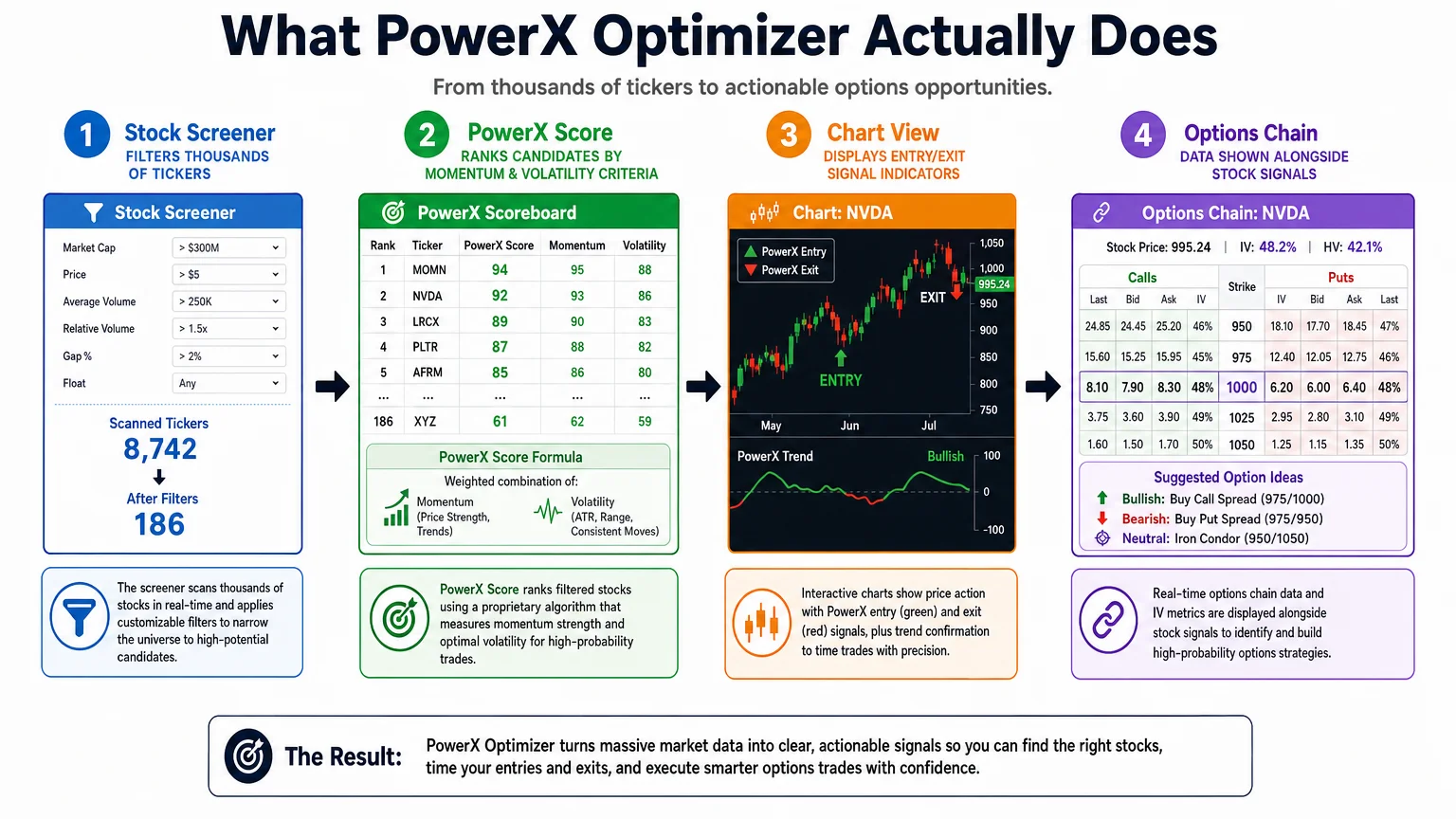
This is not a black-box process in the sense that the underlying methodology is documented and taught through Rockwell Trading’s educational materials. The score is meant to reflect how well a given stock fits the PowerX Strategy’s entry conditions on a given day. Traders are expected to review the flagged candidates, not blindly act on them. The screener narrows the field — it does not make the decision.
The screener runs on end-of-day data, which is an important distinction. This is not a real-time intraday scanner. The workflow is designed around reviewing candidates after market close and placing trades the following morning, typically at or near the open.
What Do the Entry and Exit Signals Actually Tell You?
Once a stock is selected from the screener, the chart view displays signal indicators — visual markers that suggest potential entry and exit points based on the strategy’s rules. These signals are derived from a combination of standard technical indicators (including moving averages and momentum oscillators) configured specifically for the PowerX approach.
The signals are prescriptive in the sense that they reflect the strategy’s rules, not a trader’s personal preferences. A green signal suggests conditions align for a long entry; the exit signals indicate where the strategy’s rules suggest closing the position. The software also displays a built-in risk/reward calculator that shows potential profit targets and stop-loss levels based on the signal parameters.
What the signals do not do: they do not account for news events, earnings announcements, macroeconomic shifts, or any qualitative factor. They are purely technical. A signal that looks clean on a chart can still result in a loss — that is the nature of probabilistic trading, and no software eliminates that reality.
PowerX Optimizer’s Options Integration: What’s Included?
Alongside the stock signals, PowerX Optimizer displays options data relevant to the trade setup. This typically includes suggested options structures — often single-leg calls or puts — with relevant expiration and strike information aligned to the strategy’s parameters.
This is one of the features that distinguishes it from a pure stock screener. Rather than requiring the trader to separately analyze an options chain, the software surfaces a suggested options approach alongside the stock signal. This is useful for traders who are following the PowerX Strategy specifically, and less useful for traders who want to explore complex multi-leg options structures or run their own options analysis.
For those newer to options tools, Options Trading Software for Beginners: What to Look for provides a useful framework for evaluating what any options-focused platform should offer.
What PowerX Optimizer Does Not Do — A Precise List
This is where many software reviews go vague. The limitations of PowerX Optimizer are worth stating directly.
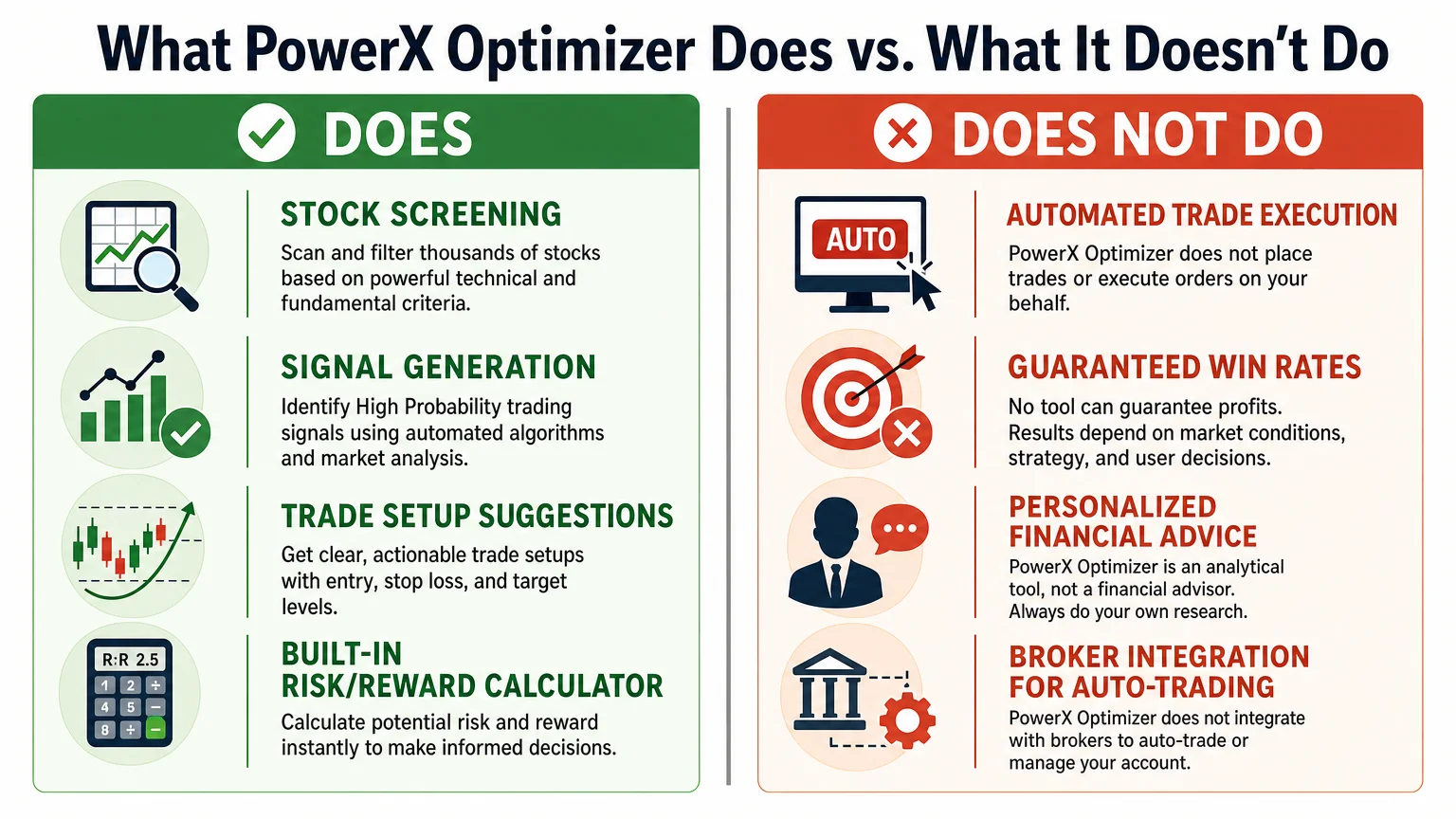
It does not execute trades. There is no brokerage integration that allows the software to place orders on your behalf. Trades must be placed manually through a separate brokerage platform.
It does not provide personalized investment advice. The software generates signals based on its methodology. It does not know your financial situation, risk tolerance, tax circumstances, or investment goals. It is a tool, not an adviser.
It does not cover all asset classes. PowerX Optimizer is designed for U.S. stocks and options. It is not built for futures, forex, cryptocurrency, or international equities.
It does not guarantee performance. No verified win rate, return figure, or profit claim is made here — and any source making such claims without verified, audited data should be read skeptically.
It does not replace education. The software is most coherent when the user understands the underlying strategy. Using it without that context means acting on signals without understanding why they were generated.
For a direct feature comparison with a well-known alternative, PowerX Optimizer vs. Thinkorswim: A Side-by-Side Look examines where each platform is stronger.
How Does It Compare to General-Purpose Charting Platforms?
| Feature | PowerX Optimizer | General Charting Platform (e.g., Thinkorswim) |
|---|---|---|
| Stock screener | Built-in, strategy-specific | Customizable, broad |
| Signal indicators | Pre-configured, strategy-based | User-configured |
| Options integration | Simplified, strategy-aligned | Full options chain, complex strategies |
| Trade execution | Not available | Available (broker-native) |
| Learning curve | Lower for the specific strategy | Higher for full customization |
| Asset coverage | U.S. stocks and options | Stocks, options, futures, forex |
| Methodology | Single, defined approach | Methodology-agnostic |
The comparison is not about which platform is objectively better — it is about fit. A trader who wants to follow one defined strategy with a streamlined daily workflow is a different user than a trader who wants maximum flexibility and multi-asset coverage.
What Does It Cost, and Is It Worth Evaluating?
Pricing for PowerX Optimizer is available through Rockwell Trading’s official channels and can change. For a current, verified breakdown of what is included at each tier, How Much Does PowerX Optimizer Cost? A Verified Breakdown covers the details without speculation.
Whether it is worth evaluating depends on fit: traders who are interested in a structured, rules-based approach to stock and options trading — and who are willing to learn the underlying methodology — will get more from the software than those who want a flexible, open-ended platform.
What Are the Risk Considerations Every Prospective User Should Know?
Trading stocks and options involves substantial risk of loss. This is not a disclaimer to skip past — it is the most practically important fact about any trading activity. Software can support a process, but it cannot remove the inherent uncertainty of financial markets.
PowerX Optimizer is a decision-support tool. It narrows a list of candidates and provides structured signal information. What happens after a trade is placed is subject to market conditions that no software can predict. Position sizing, risk management, and the discipline to follow a strategy consistently are the trader’s responsibility.
For a grounded overview of what new traders specifically need to understand before using any trading software, Stock and Options Trading Risk: What New Traders Must Know is a useful starting point.
Conclusion
PowerX Optimizer is a focused, opinionated tool. It does one thing — apply a specific trading methodology to a large stock universe and surface structured trade candidates — and it does not try to be everything to every trader. That focus is both its strength and its constraint.
Understanding precisely what the software does, and what it does not do, is the most useful starting point for any prospective user. The signals it generates are only as valuable as the trader’s understanding of the strategy behind them, and no software substitutes for sound risk management and realistic expectations.
For a deeper look at how the platform performs in practice, PowerX Optimizer Explained: What the Software Actually Does offers additional context on the day-to-day experience of using it.
Frequently Asked Questions
Does PowerX Optimizer automatically place trades?
No. PowerX Optimizer does not connect to a brokerage or execute trades automatically. All orders must be placed manually through a separate brokerage account. The software identifies and displays trade candidates and signals; acting on them is entirely the trader's responsibility.
Is PowerX Optimizer suitable for complete beginners?
It is designed around a specific strategy that requires some foundational understanding of stocks and options. Complete beginners may find the signals difficult to act on confidently without first building basic trading literacy. Rockwell Trading offers educational materials alongside the software, which are intended to address this gap.
What markets does PowerX Optimizer cover?
The software is built for U.S.-listed stocks and options. It is not designed for futures, forex, cryptocurrency, or international equities.
Does the software provide investment advice?
No. PowerX Optimizer generates signals based on its methodology. It does not know a user's financial situation, goals, or risk tolerance, and it does not constitute personalized investment advice. Users should consult a qualified financial professional for advice relevant to their individual circumstances.
How often does the screener update?
The screener operates on end-of-day data. It is designed for a workflow where traders review candidates after market close and act the following trading day — not for intraday scanning or real-time signal generation.
Can PowerX Optimizer be used alongside other platforms?
Yes. Because it does not execute trades, it functions as a screening and analysis layer that sits alongside a brokerage platform. Many users review signals in PowerX Optimizer and then place trades through a separate broker interface.
Where can I find verified pricing information?
Pricing is set by Rockwell Trading and can change. The most reliable source is Rockwell Trading's official website. An independently verified breakdown is also available at [How Much Does PowerX Optimizer Cost? A Verified Breakdown](/blog/how-much-does-powerx-optimizer-cost-a-verified-breakdown/).
Richard independently publishes Economics Savvy and has owned and used PowerX Optimizer since 2020. He shares first-hand observations about its workflow, features, limitations, and trading risk.