

Economics Savvy provides independent, risk-aware reviews of trading software and education based on daily use. Affiliate links are clearly disclosed; content is educational, not investment advice.
Key Takeaways
- PowerX Optimizer is a scanning and strategy tool developed by Rockwell Trading, designed for traders who can dedicate roughly 30 minutes per day.
- The software focuses on stocks and options, using a rule-based scoring system to surface trade candidates.
- It is not a fully automated trading bot — it generates signals and setups, but you execute trades manually.
- The tool is best suited for traders who want a structured, repeatable process rather than discretionary chart reading.
- Trading stocks and options involves substantial risk of loss; no software eliminates that risk.
- Costs and subscription terms should be verified directly with Rockwell Trading before purchasing.
- Economics Savvy is an independent affiliate site and may earn a commission on qualifying purchases at no extra cost to you.
What Exactly Is PowerX Optimizer?
PowerX Optimizer is a desktop-based trading software created by Rockwell Trading. At its core, it scans a universe of stocks and options, scores them according to a defined set of criteria, and presents a ranked shortlist of potential trade setups. The goal is to reduce the time a trader spends on manual screening so more energy goes toward evaluating and executing the best candidates.
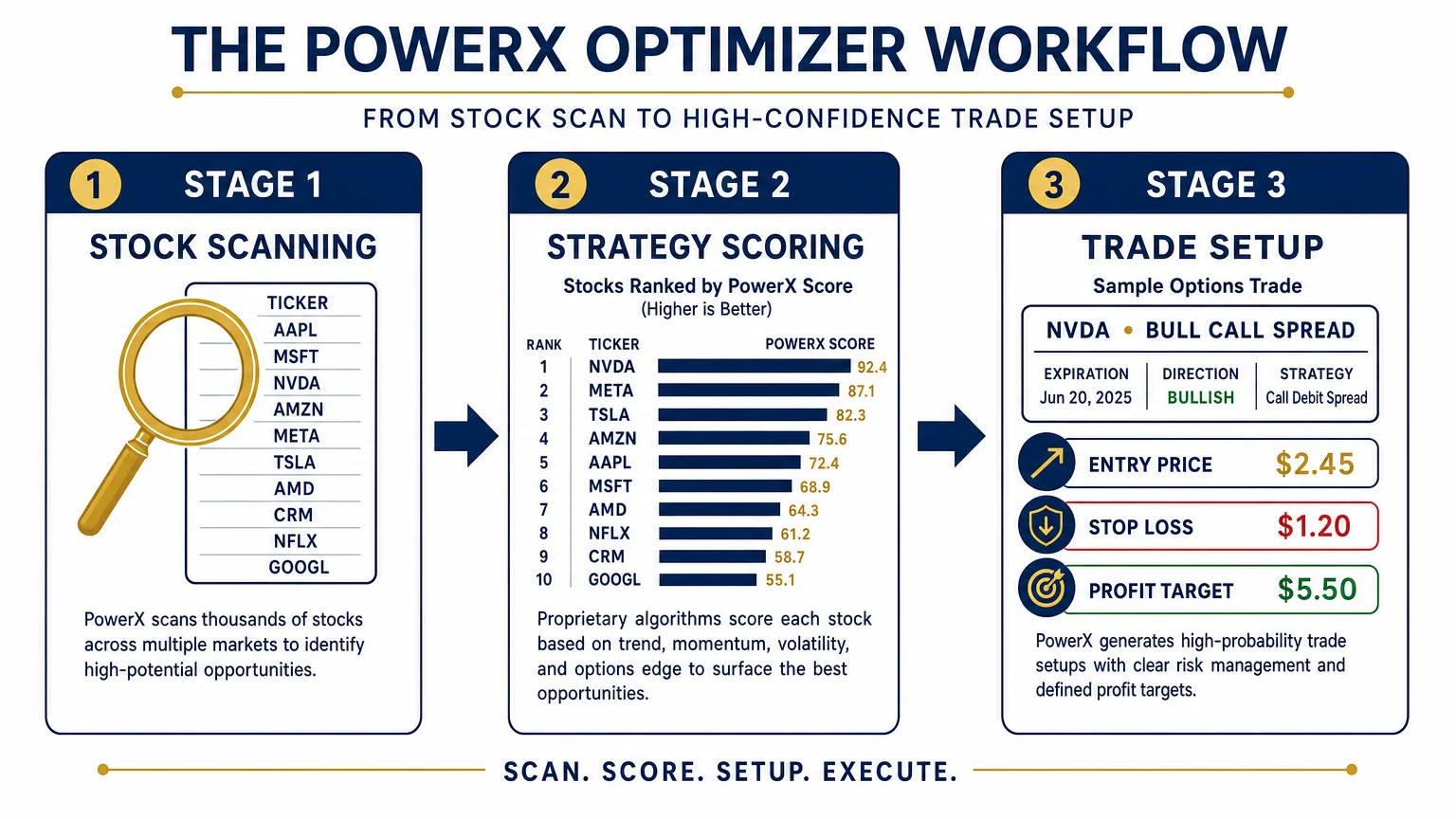
The software is built around what Rockwell Trading calls the “PowerX Strategy” — a rules-based approach that combines momentum indicators with options structures. Rather than asking you to interpret raw charts from scratch each morning, it applies a consistent scoring methodology and surfaces the setups that meet its thresholds. For a deeper look at the feature set, see the PowerX Optimizer review: what it does and who it’s for.
Is PowerX Optimizer a Trading Bot That Executes Trades Automatically?
No. This is one of the most common misconceptions. PowerX Optimizer is a decision-support tool, not an automated execution system. It scans, scores, and recommends — but every trade entry, adjustment, and exit is placed manually by the trader through their own brokerage account.
This distinction matters for two reasons. First, it means you remain in full control of your capital at all times. Second, it means the software’s output is only as useful as the trader’s willingness to follow the process consistently. Automation seekers will need to look elsewhere; traders who want a structured daily workflow will find this design more appropriate.
How Much Time Does It Require Each Day?
Rockwell Trading positions PowerX Optimizer as a tool for busy adults, with a stated workflow of approximately 30 minutes per day. That window typically covers running the scan, reviewing the ranked results, checking open positions, and placing any new orders.
That said, actual time will vary. Beginners often spend longer in the early weeks as they learn the interface and build confidence interpreting the output. The 30-minute figure reflects a practiced user following a repeatable routine, not someone still in the learning phase.
What Markets and Instruments Does It Cover?
PowerX Optimizer focuses primarily on U.S.-listed stocks and the options contracts tied to them. It is not designed for futures, forex, cryptocurrencies, or international equities. If your primary interest is in those asset classes, this tool is not the right fit.
Within U.S. equities and options, the scanner filters for liquidity, volatility characteristics, and other criteria that make a stock suitable for the strategy. The result is a curated list rather than a raw dump of every ticker on an exchange.
What Does the PowerX Score Actually Mean?
The PowerX Score is the software’s internal ranking metric. It aggregates several technical and volatility-related inputs into a single number that indicates how well a given stock or options setup aligns with the PowerX Strategy criteria at that moment.
A higher score does not mean a trade will be profitable — it means the setup more closely matches the strategy’s historical parameters. Scores should be treated as a prioritization filter, not a guarantee. Understanding this distinction is central to using the tool responsibly. For broader context on evaluating trading software, the trading software section of this site covers key criteria worth reviewing.
How Does PowerX Optimizer Compare to a Platform Like Thinkorswim?
These two tools serve different purposes. Thinkorswim is a full-featured brokerage platform with advanced charting, paper trading, and direct order execution. PowerX Optimizer is a scanning and strategy tool that sits alongside a brokerage — you still need a separate broker account to execute trades.
The comparison is less “which is better” and more “which does what.” A trader might use PowerX Optimizer to identify and rank setups, then execute through their existing broker. For a structured side-by-side breakdown, PowerX Optimizer vs. Thinkorswim: how they compare walks through the key differences in detail.
Who Is PowerX Optimizer Best Suited For?
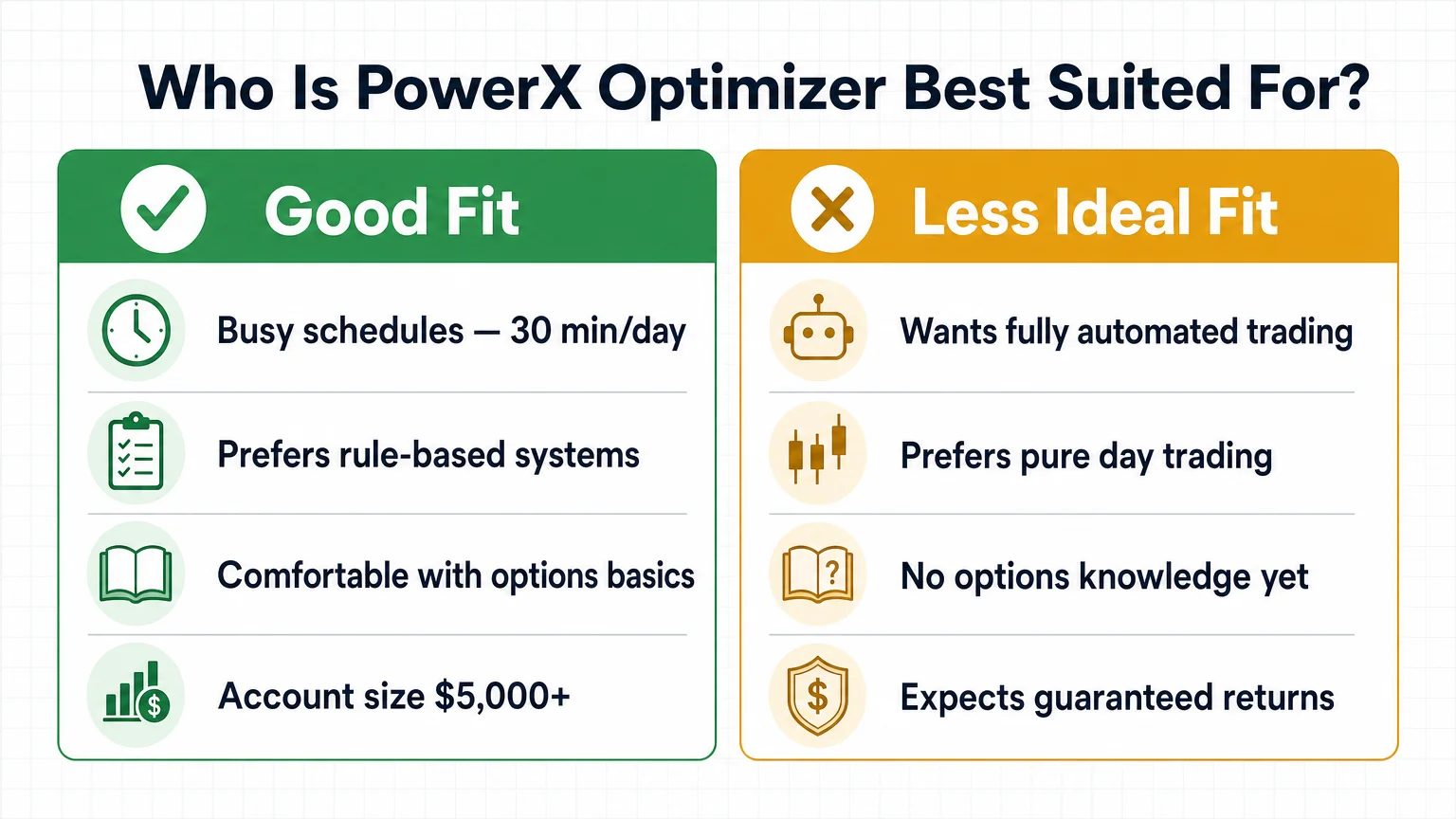
The software is designed for traders who prefer a rules-based, systematic approach over discretionary analysis. It suits someone with a modest daily time budget, a basic understanding of options mechanics, and an account size sufficient to trade options on individual stocks.
It is less suited for pure day traders looking for intraday scalping signals, traders who want full automation, or complete beginners with no prior exposure to how options work. If you are brand new to options, investing time in options trading education before evaluating the software will make the trial period significantly more productive.
What Are the Costs Involved?
Specific pricing for PowerX Optimizer should be verified directly with Rockwell Trading, as subscription structures and promotional terms can change. Economics Savvy does not publish specific price figures to avoid presenting outdated information as current fact.
What is worth noting: the software cost is separate from brokerage commissions, the capital you deploy in trades, and any additional educational resources you choose to purchase. Factor all of these into your total cost assessment before deciding.
Does It Come With Training or Support?
Rockwell Trading offers educational materials alongside the software. The extent and format of that support — video tutorials, live sessions, community access — should be confirmed on their current product page, as offerings evolve over time.
The learning curve for the software itself is moderate. The interface is purpose-built rather than a general-purpose charting tool, which means fewer features to learn but also less flexibility for traders who want to customize heavily.
What Are the Realistic Risks of Using This Software?
This question belongs in every PowerX Optimizer FAQ discussion, and it deserves a direct answer. Trading stocks and options involves substantial risk of loss. No scanning tool, scoring system, or strategy framework changes that fundamental reality. A software that surfaces high-scoring setups cannot guarantee those trades will be profitable.
Specific risks include: market conditions that differ from historical patterns the strategy was built on, execution errors, position sizing mistakes, and the psychological challenge of following a rules-based system consistently when individual trades go against you. The trading risk section of this site covers these dynamics in more depth and is worth reading before committing capital to any strategy.
Is There a Trial or Money-Back Option?
Trial and refund policies vary and change over time. Any claims about free trials, money-back guarantees, or promotional pricing should be confirmed directly with Rockwell Trading at the time of purchase. Economics Savvy does not verify or guarantee the current availability of any specific offer terms.
How Does This FAQ Fit Into a Broader Research Process?
A FAQ like this one is a starting point, not a complete due diligence process. After reviewing the 12 questions beginners actually ask in this PowerX Optimizer FAQ, the logical next steps are: reading a full software review, comparing it against alternatives, and — if you proceed — starting with a paper trading or small-position phase before committing significant capital.
No single article, including this one, substitutes for understanding your own risk tolerance, financial situation, and trading goals. For context on how Economics Savvy approaches these topics, the about page explains the site’s perspective and affiliate relationship with Rockwell Trading.
Frequently Asked Questions
Does PowerX Optimizer work with any brokerage?
PowerX Optimizer is a standalone scanning tool, not a brokerage platform. You can use it alongside most U.S. brokerage accounts, but compatibility specifics — including any direct integrations — should be confirmed with Rockwell Trading before purchasing.
Can a complete beginner use PowerX Optimizer effectively?
The software is designed to simplify the stock and options selection process, but it assumes the user understands basic options mechanics. A complete beginner with no options knowledge will likely struggle to act on the signals it generates and should pursue foundational options education first.
Does the software guarantee profitable trades?
No. PowerX Optimizer is a decision-support tool that applies a rules-based scoring system. It does not guarantee any trade outcome. Trading involves substantial risk of loss, and past performance of any strategy does not guarantee future results.
Is Economics Savvy affiliated with Rockwell Trading?
Economics Savvy is an independent affiliate website. It may earn a commission if you purchase PowerX Optimizer through a link on this site, at no additional cost to you. Economics Savvy is not Rockwell Trading and does not provide personalized investment advice. See the affiliate disclosure for full details.
How often does the software update its scan results?
Scan results are typically refreshed based on end-of-day data, aligning with the software’s positioning as a tool for traders who review setups outside of market hours. Intraday real-time scanning is not the primary use case. Confirm current data refresh details with Rockwell Trading.
What account size is generally recommended to use this strategy?
Rockwell Trading’s published guidance on minimum account sizes should be checked directly, as recommendations can change. As a general principle, options trading requires enough capital to manage position sizing responsibly and absorb losses without catastrophic account damage.
Where can I read a more detailed review of PowerX Optimizer?
The PowerX Optimizer review: what it does and who it’s for on this site covers the feature set, workflow, and suitability considerations in greater depth than a FAQ format allows.
Conclusion
The 12 questions in this PowerX Optimizer FAQ cover the practical ground most beginners need before making a decision: what the software does, who it suits, what it costs in time and money, and what risks remain regardless of the tool you use. The clearest takeaway is that PowerX Optimizer is a structured scanning and strategy tool — useful for traders who want a repeatable daily process, and not a fit for those seeking full automation or intraday signals.
If this FAQ has been useful, the natural next step is a closer look at the full PowerX Optimizer review, or a review of the trading risk considerations that apply to any strategy you choose to pursue.
Trading stocks and options involves substantial risk of loss and may not be suitable for all investors. Nothing on this site constitutes personalized investment advice.
Frequently Asked Questions
Does PowerX Optimizer work with any brokerage?
PowerX Optimizer is a standalone scanning tool, not a brokerage platform. You can use it alongside most U.S. brokerage accounts, but compatibility specifics — including any direct integrations — should be confirmed with Rockwell Trading before purchasing.
Can a complete beginner use PowerX Optimizer effectively?
The software is designed to simplify the stock and options selection process, but it assumes the user understands basic options mechanics. A complete beginner with no options knowledge will likely struggle to act on the signals it generates and should pursue foundational options education first.
Does the software guarantee profitable trades?
No. PowerX Optimizer is a decision-support tool that applies a rules-based scoring system. It does not guarantee any trade outcome. Trading involves substantial risk of loss, and past performance of any strategy does not guarantee future results.
Is Economics Savvy affiliated with Rockwell Trading?
Economics Savvy is an independent affiliate website. It may earn a commission if you purchase PowerX Optimizer through a link on this site, at no additional cost to you. Economics Savvy is not Rockwell Trading and does not provide personalized investment advice. See the [affiliate disclosure](/affiliate-disclosure/) for full details.
How often does the software update its scan results?
Scan results are typically refreshed based on end-of-day data, aligning with the software's positioning as a tool for traders who review setups outside of market hours. Intraday real-time scanning is not the primary use case. Confirm current data refresh details with Rockwell Trading.
What account size is generally recommended to use this strategy?
Rockwell Trading's published guidance on minimum account sizes should be checked directly, as recommendations can change. As a general principle, options trading requires enough capital to manage position sizing responsibly and absorb losses without catastrophic account damage.
Where can I read a more detailed review of PowerX Optimizer?
The PowerX Optimizer review: what it does and who it's for on this site covers the feature set, workflow, and suitability considerations in greater depth than a FAQ format allows.
Economics Savvy provides independent, risk-aware reviews of trading software and education based on daily use. Affiliate links are clearly disclosed; content is educational, not investment advice.