

Richard independently publishes Economics Savvy and has owned and used PowerX Optimizer since 2020. He shares first-hand observations about its workflow, features, limitations, and trading risk.
Roughly 90% of retail traders who open a brokerage account never develop a repeatable process for selecting trades. PowerX Optimizer is a piece of software designed specifically to address that gap — not by predicting markets, but by structuring the decision-making workflow a trader goes through before placing a trade.
This article explains what the software actually does, feature by feature, so you can evaluate whether it fits your situation.
Key Takeaways
- PowerX Optimizer is a stock and options screening and trade-planning tool developed by Rockwell Trading.
- Its core function is narrowing a universe of thousands of tickers down to a short, ranked list based on a defined set of criteria.
- The software generates buy and sell signals using a combination of three technical indicators: RSI, MACD, and Stochastics.
- A built-in trade calculator helps users define entry price, stop loss, profit target, and position size before entering a trade.
- The software is designed for traders who want a structured, repeatable process — not for those seeking automated execution or algorithmic trading.
- It covers both stocks and options, with specific functionality oriented toward weekly options strategies.
- PowerX Optimizer is a decision-support tool; it does not place trades, manage positions, or guarantee outcomes.
- Trading stocks and options involves substantial risk of loss and may not be suitable for all investors.
What Is PowerX Optimizer and Who Makes It?
PowerX Optimizer is proprietary trading software developed and sold by Rockwell Trading, a company founded by Markus Heitkoetter. The software is marketed toward retail traders — specifically those who want to trade stocks and options on a part-time basis without spending hours each day on manual research.
The product sits at the intersection of a stock screener and a trade-planning tool. It is not a brokerage platform, not a robo-advisor, and not an automated trading system. It is software that helps a trader decide what to look at and how to structure a trade before they go to their broker and execute.
For a fuller picture of the cost side of the equation, see the verified breakdown of PowerX Optimizer’s pricing.
How Does the Screening Engine Work?
The screening engine is the first stage of the PowerX Optimizer workflow. It scans a broad universe of stocks — the software is commonly described as covering thousands of tickers across major U.S. exchanges — and filters them down based on criteria that include price range, average daily volume, and the software’s internal signal logic.
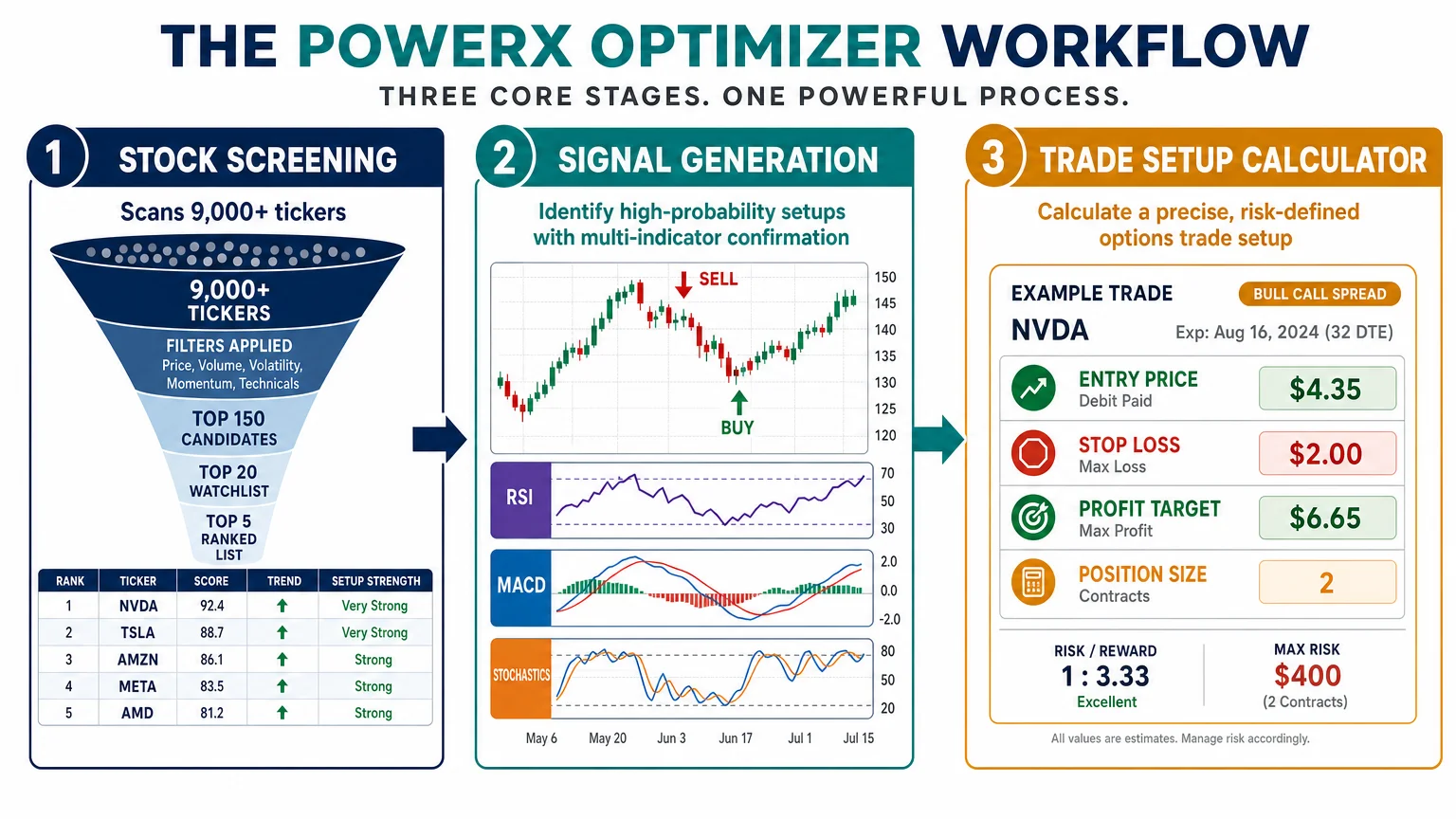
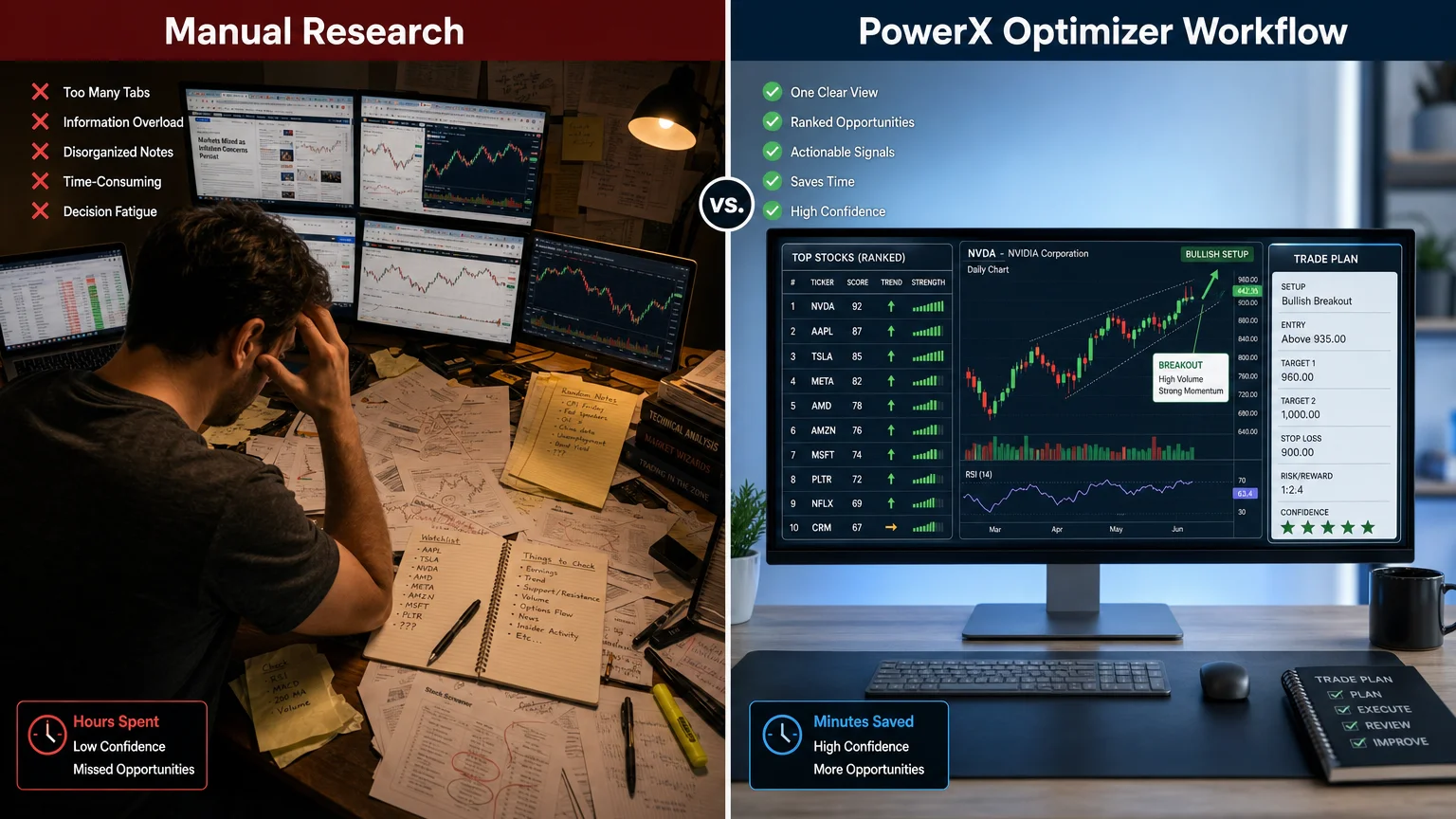
The output is a ranked list of tickers that meet the defined criteria on any given trading day. Rather than presenting a trader with hundreds of candidates, the goal is to surface a manageable short list — typically a handful of names — that the software’s algorithm has flagged as meeting its setup conditions. This is the part of the workflow that replaces the manual process of scrolling through charts or running separate screeners on third-party platforms.
The ranking within that list reflects the software’s assessment of which setups are strongest according to its scoring model. Traders can then review those candidates individually before making any decision.
What Signals Does PowerX Optimizer Generate?
The signal logic in PowerX Optimizer is built on three widely used technical indicators: the Relative Strength Index (RSI), the Moving Average Convergence Divergence (MACD), and Stochastics. When all three align in the same direction, the software generates a buy or sell signal on a given ticker.
This multi-indicator approach is designed to reduce false signals that any single indicator might produce in isolation. The logic is transparent: the software is not a black box in the sense that the underlying indicators are well-documented and used broadly across retail and professional trading. What PowerX Optimizer does is automate the process of checking all three simultaneously across a large number of tickers.
Signals appear directly on the chart view within the software, typically as arrows or color-coded markers at the relevant candlestick. Traders see the signal, review the chart context, and then decide whether to act. The software does not make that decision for them.
For a direct comparison of how this signal approach stacks up against a full-featured brokerage platform, the side-by-side look at PowerX Optimizer vs. Thinkorswim covers the key differences.
What Does the Trade Planning Calculator Do?
Once a trader identifies a candidate from the screener and reviews its signal, the trade planning calculator is the next functional layer. This tool helps define the four variables that should be set before any trade is placed: entry price, stop loss level, profit target, and position size.
The calculator is particularly relevant for options traders because it incorporates the options-specific variables — strike selection, expiration, and contract quantity — into the planning process. The software is oriented toward weekly options strategies, meaning it is built around short-duration trades rather than long-term position holding.
The practical value here is discipline enforcement. Many retail traders enter positions without a defined exit plan on either side. By requiring the trader to input these parameters before acting, the calculator creates a structured record of the intended trade logic. Whether a trader follows that plan is still a human decision, but the tool removes the excuse of not having thought it through.
Is PowerX Optimizer a Complete Trading System?
Understanding what the software does not do is as important as understanding what it does. PowerX Optimizer does not execute trades. It does not connect directly to a brokerage to place orders. It does not manage open positions or adjust stop losses automatically. It does not provide real-time news, earnings calendars, or fundamental data.
It is a screening and planning tool. The trader still needs a brokerage account, still needs to place their own orders, and still bears full responsibility for every trade decision. The software’s role ends at the point where the trader has a structured setup in front of them.
| Feature | PowerX Optimizer | What It Is Not |
|---|---|---|
| Stock/options screener | ✅ Yes | ❌ Not a brokerage |
| Technical signal generation | ✅ Yes | ❌ Not automated execution |
| Trade plan calculator | ✅ Yes | ❌ Not a position manager |
| Chart visualization | ✅ Yes | ❌ Not a real-time news feed |
| Weekly options focus | ✅ Yes | ❌ Not a fundamental analysis tool |
For a practical, workflow-level look at how this plays out day to day, the one-week workflow observation offers grounded detail.
Who Is This Software Actually Built For?
PowerX Optimizer is designed for a specific type of trader: someone who has a basic understanding of stocks and options, wants a structured process rather than building one from scratch, and is trading on a part-time basis without the time to conduct hours of manual research each session.
It is probably not the right fit for day traders who need tick-by-tick data and direct market access tools. It is also not designed for traders who prefer a purely fundamental approach or who want to build their own custom screeners with highly specific parameters.
The software assumes a certain philosophy — that a rules-based, signal-driven approach to trade selection is preferable to discretionary stock-picking. Traders who disagree with that premise will find the tool’s structure limiting rather than helpful.
Before purchasing, it is worth working through the 10 questions to ask before buying PowerX Optimizer to assess fit honestly.
What Are the Honest Limitations to Know?
No screening tool eliminates trading risk, and PowerX Optimizer is no exception. Signals generated by technical indicators are backward-looking by nature — they reflect what price has done, not what it will do. A signal that meets all three indicator conditions can still result in a losing trade.
The software also does not account for broader market conditions, sector rotation, earnings announcements, or macroeconomic events that can override any technical setup. Traders who use it without understanding these limitations may over-rely on the signal output and under-apply their own judgment.
For anyone still evaluating whether paid tools are worth the cost compared to free alternatives, the comparison of paid vs. free options trading education resources provides useful context.
Risk disclosure: Trading stocks and options involves substantial risk of loss. Past performance of any tool, signal, or strategy does not guarantee future results. PowerX Optimizer is a decision-support tool, not investment advice.
Conclusion
PowerX Optimizer is a structured screening and trade-planning tool built around a defined technical methodology. It narrows a large stock universe to a short list of candidates, flags setups where three indicators align, and provides a calculator to plan the trade before execution. What it does not do is trade for you, manage risk automatically, or eliminate the possibility of loss.
For traders who want a repeatable process and are willing to apply their own judgment within that structure, the software addresses a real workflow problem. For those expecting a signal service that produces reliable profits, the expectations need recalibrating before any purchase decision is made.
To continue your research, read the common questions about PowerX Optimizer answered honestly or review what to evaluate before buying any trading software.
Frequently Asked Questions
What does PowerX Optimizer actually do?
PowerX Optimizer scans a large universe of stocks, filters them using technical criteria, generates buy and sell signals based on RSI, MACD, and Stochastics, and provides a trade planning calculator to define entry, stop loss, profit target, and position size before a trade is placed.
Does PowerX Optimizer place trades automatically?
No. The software does not connect to a brokerage or execute orders. It is a screening and planning tool. The trader reviews the output and places their own trades manually through their brokerage account.
What indicators does PowerX Optimizer use?
The signal logic is based on three technical indicators: RSI (Relative Strength Index), MACD (Moving Average Convergence Divergence), and Stochastics. A signal is generated when all three align in the same direction.
Is PowerX Optimizer designed for stocks, options, or both?
It covers both. The software is particularly oriented toward weekly options strategies, though the screening and signal functionality applies to the underlying stocks as well.
Who makes PowerX Optimizer?
PowerX Optimizer is developed and sold by Rockwell Trading, a company founded by Markus Heitkoetter.
Can a beginner use PowerX Optimizer effectively?
The software is designed to simplify the research and planning process, but it assumes the user has at least a foundational understanding of how stocks and options work. Complete beginners may need supplementary education before the tool's output is actionable.
Does using PowerX Optimizer guarantee profitable trades?
No. No software, signal, or strategy guarantees profitable outcomes. Trading involves substantial risk of loss, and the software's signals are based on historical price behavior, which does not predict future results.
Where can I find verified pricing information for PowerX Optimizer?
For a current, verified breakdown of what the software costs, see the PowerX Optimizer cost breakdown on this site.
Richard independently publishes Economics Savvy and has owned and used PowerX Optimizer since 2020. He shares first-hand observations about its workflow, features, limitations, and trading risk.