

Economics Savvy provides independent, risk-aware reviews of trading software and education based on daily use. Affiliate links are clearly disclosed; content is educational, not investment advice.
Most traders don’t need another promise — they need a clear picture of what a tool actually looks like in daily use. This article documents a structured, one-week workflow observation of PowerX Optimizer, the stock and options scanning software developed by Rockwell Trading. The goal is straightforward: describe what the software does each day, how it fits into a trading routine, and where its practical limits become visible.
Key Takeaways
- PowerX Optimizer is designed to reduce the time traders spend scanning for candidates by applying a defined set of criteria automatically.
- The software surfaces stock and options trade setups based on its built-in signal logic — it does not execute trades.
- A typical daily session using the software can be completed in a focused window, making it relevant for traders with limited screen time.
- The tool is best understood as a structured decision-support system, not a prediction engine.
- Understanding the cost structure before committing is important — see the verified cost breakdown for PowerX Optimizer for current pricing details.
- The software has a learning curve; new users will need time to understand how signals are generated and how to apply them within their own risk tolerance.
- Trading stocks and options involves substantial risk of loss. No software eliminates that risk.
- This observation reflects workflow patterns, not performance claims or win-rate statistics.
What Does PowerX Optimizer Actually Do on a Daily Basis?
PowerX Optimizer is a scanning and signal tool. Each day, it processes a universe of stocks and options and filters them against a set of criteria built into the platform — factors related to trend, momentum, and volatility. The output is a ranked list of potential trade candidates, each accompanied by suggested entry, stop-loss, and profit-target levels.
For a fuller technical explanation of the platform’s mechanics, the article PowerX Optimizer Explained: What the Software Actually Does covers the underlying logic in detail. What matters for a workflow observation is simpler: the software takes a large problem (which stocks to consider today?) and compresses it into a manageable list.
During the observation week, the daily scan process followed a consistent pattern: open the software after market close or before the next open, review the ranked candidates, cross-reference with personal risk parameters, and note any setups worth monitoring. The interface is organized enough that this process did not require extended session time on most days.
How Is a Typical Week Structured When Using PowerX Optimizer?
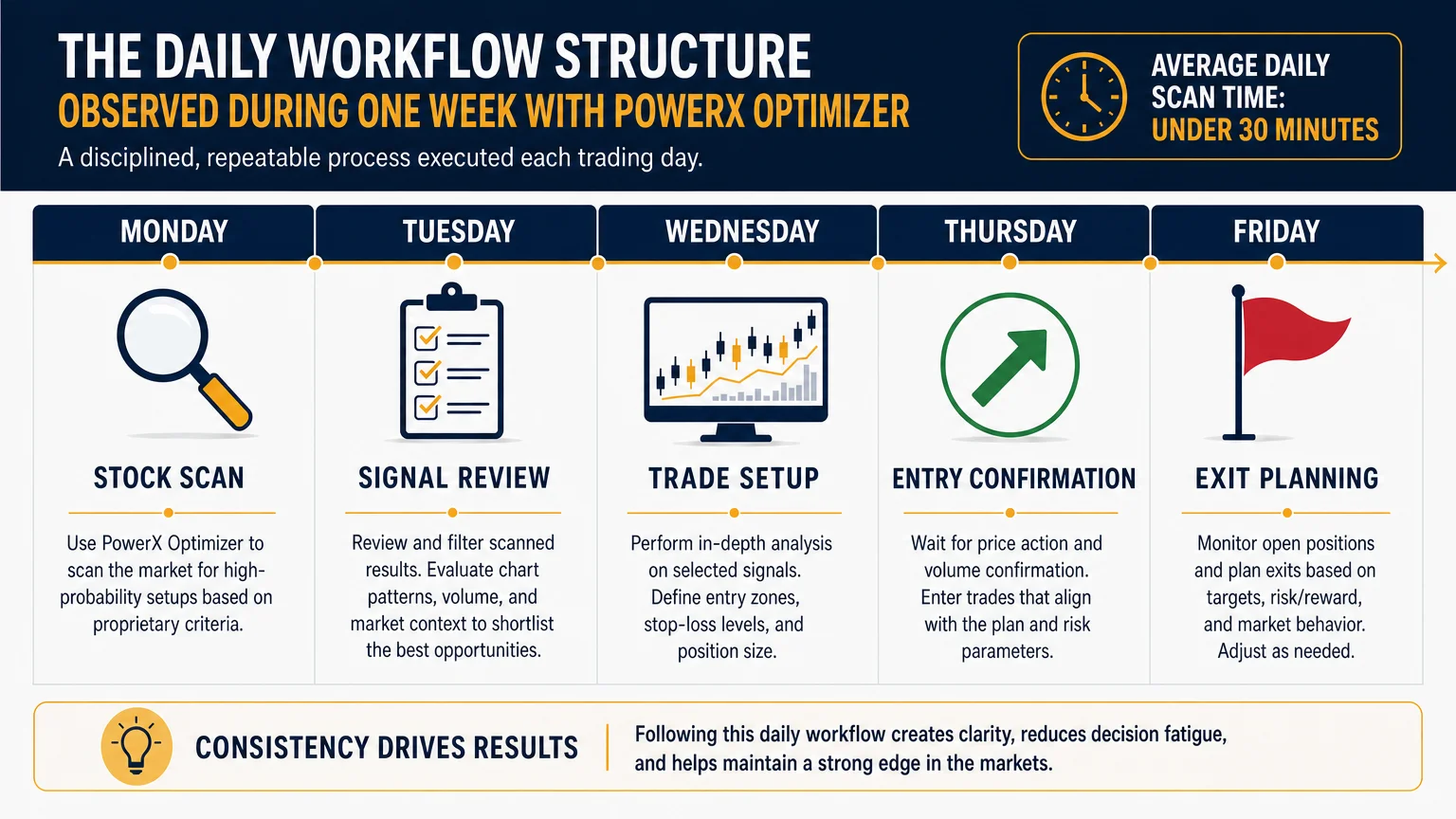
The week-long observation revealed a rhythm that most working adults could realistically maintain. Here is what the daily workflow looked like across five trading days:
Monday: Initial scan run after the weekend. The candidate list tends to be longer after two closed days. Time spent reviewing: approximately 20–30 minutes. Several setups were flagged for the week ahead.
Tuesday–Thursday: Daily incremental scans. The list updates based on new price action. Active setups from Monday were checked against current signals. New candidates occasionally appeared; some prior setups were invalidated by price movement. Each daily session ran 15–25 minutes.
Friday: End-of-week review. Open positions (if any) were assessed against exit criteria. The software’s suggested stop and target levels were compared against actual price behavior. Notes were recorded for the following week.
The overall structure is consistent with what Rockwell Trading describes as a “part-time trader” workflow — a term they use to indicate that the platform is designed for traders who cannot monitor markets continuously. That framing held up across the observation period. The tool does not require all-day attention.
What Are the Genuine Strengths Observed During the Week?
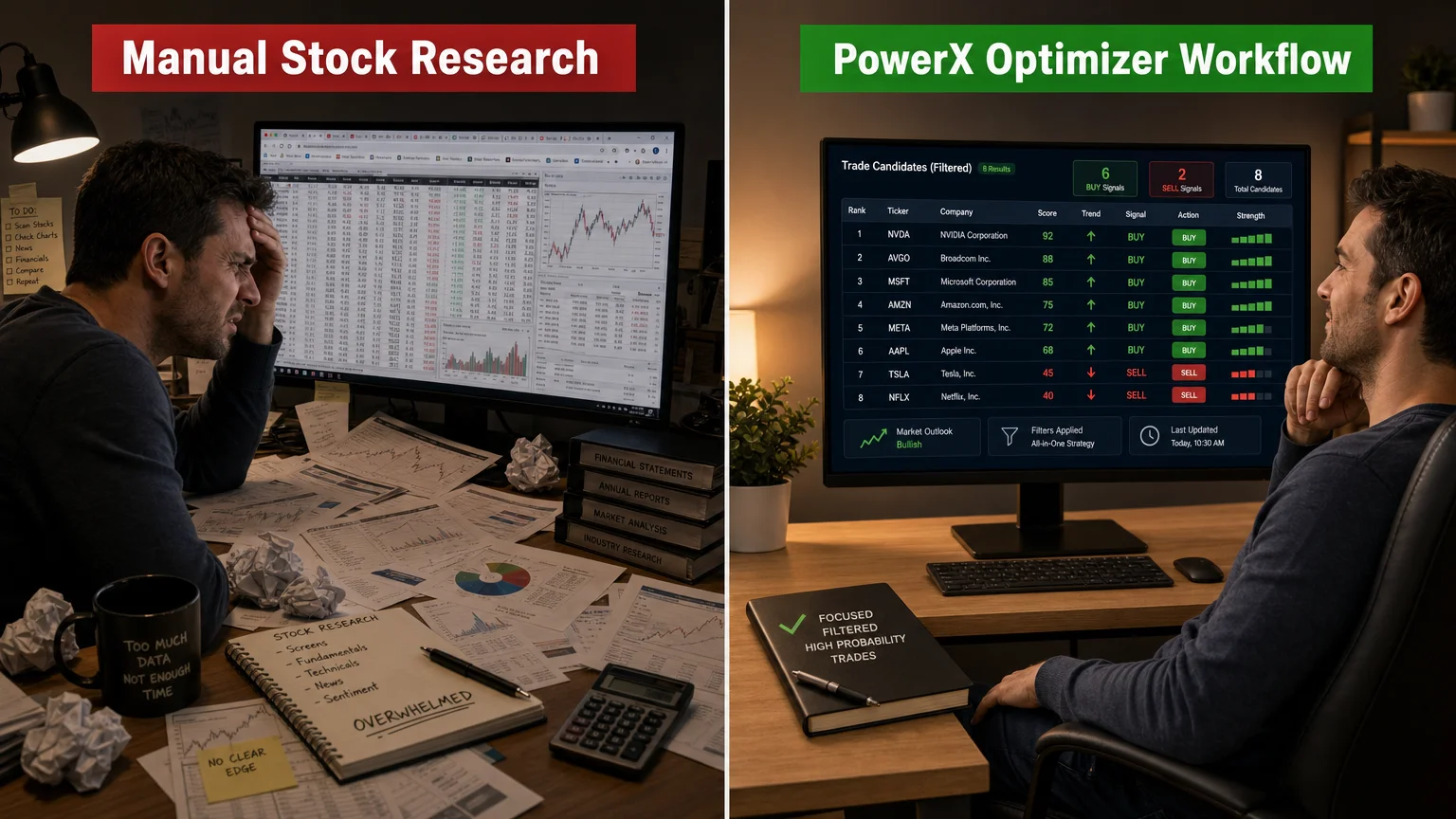
The most evident strength is signal consolidation. Rather than maintaining multiple watchlists, running separate screeners, or manually reviewing dozens of charts, the software presents a single filtered output. For traders who have previously spent significant time on pre-market research, this compression of effort is meaningful.
The signal presentation is also consistent. Each candidate displays the same data fields in the same layout, which reduces cognitive load during review. There is no ambiguity about what the software is suggesting — entry, stop, and target are explicit.
A secondary strength is the educational framing built into the platform. The software is designed alongside Rockwell Trading’s broader educational content, so users who are also working through their training materials will find the tool and the curriculum mutually reinforcing. The Financial Fortress audiobook is one example of the supporting content Rockwell offers alongside the software.
What Limitations Became Apparent Over the Week?
No scanning tool is neutral. PowerX Optimizer’s signal logic is proprietary, which means users are working with a system they cannot fully audit. During the observation week, several candidates appeared on the list that, on closer manual review, had contextual factors the software could not account for — upcoming earnings announcements, sector-specific news, or liquidity concerns in the options chain.
This is not a flaw unique to PowerX Optimizer; it is a structural limitation of any rule-based scanner. The software identifies patterns; it cannot read context. Traders who treat the output as a final answer rather than a starting point are likely to encounter friction.
There is also a learning curve. The first two days of the observation week involved more time than the later days, simply because understanding how to interpret the ranked list and apply personal filters takes practice. New users should expect an adjustment period before the workflow feels natural.
For traders evaluating whether this tool fits their existing setup, the comparison article PowerX Optimizer vs. Thinkorswim: A Side-by-Side Look offers useful context on how the platform differs from a more general-purpose trading platform.
Who Is This Workflow Realistically Suited For?
Based on the week-long observation, PowerX Optimizer fits a specific trader profile more than a universal one. The tool is well-suited for:
| Trader Profile | Fit Assessment |
|---|---|
| Busy professionals with limited daily screen time | Strong fit — daily workflow is compact |
| Traders who prefer defined rules over discretionary scanning | Strong fit — signal logic is explicit |
| Complete beginners with no chart-reading background | Moderate fit — education required alongside tool use |
| Active day traders needing real-time intraday signals | Weak fit — tool is oriented toward swing trading |
| Traders wanting full transparency into signal algorithms | Weak fit — logic is proprietary |
The article Is PowerX Optimizer Right for You? 10 Questions First provides a structured self-assessment that is worth reviewing before making a purchase decision.
How Does the Cost Factor Into the Workflow Evaluation?
A workflow observation is incomplete without acknowledging cost. Software that saves 20 minutes per day has a different value proposition at one price point than another. The verified cost details for PowerX Optimizer are documented separately in the PowerX Optimizer cost breakdown — this article does not reproduce pricing figures that may change, but directs readers to that verified source.
What the observation week confirmed is that the time-savings argument is real, provided the trader is consistent. Sporadic use reduces the value of any scanning tool. The workflow benefit compounds when the daily routine is maintained.
What Should Traders Evaluate Before Committing to Any Trading Software?
The one-week observation of PowerX Optimizer is one data point, not a verdict. Traders evaluating any software — this one or others — benefit from asking structured questions before purchasing. The article Stock and Options Trading Software: What to Evaluate outlines a framework for that process.
Key questions worth applying to any tool:
- Does the signal logic align with your trading style (swing vs. day vs. options)?
- Can you realistically maintain the required daily routine?
- Is the cost proportionate to your account size and trading frequency?
- Does the platform support your broker, or require a separate execution environment?
- What happens when signals conflict with your own analysis?
These questions do not have universal answers, but asking them before purchase is more useful than asking them after.
Conclusion
A one-week workflow observation of PowerX Optimizer confirms that the software does what it is designed to do: compress daily stock and options scanning into a structured, time-efficient process. The signal logic is consistent, the interface is organized, and the daily routine is realistic for traders with limited screen time. The limitations — proprietary logic, context blindness, and a learning curve — are real but not unusual for this category of tool.
For traders considering whether this fits their process, the next useful step is reviewing the options trading education resources available alongside tools like this one, or working through the self-assessment questions in the Is PowerX Optimizer Right for You? article before making a decision.
Trading stocks and options involves substantial risk of loss and may not be suitable for all investors. Nothing in this article constitutes personalized investment advice.
Frequently Asked Questions
Does PowerX Optimizer place trades automatically?
No. PowerX Optimizer is a scanning and signal tool. It identifies potential trade candidates and suggests entry, stop-loss, and profit-target levels, but it does not connect to a brokerage or execute trades on the user's behalf. All trade decisions and order entries remain with the trader.
How long does a typical daily session with PowerX Optimizer take?
Based on the workflow observation documented here, daily scan reviews typically took between 15 and 30 minutes, depending on the number of candidates generated and how much manual cross-referencing was done. The time can vary based on market conditions and individual review habits.
Is PowerX Optimizer suitable for complete beginners?
The software has a learning curve, and beginners will likely need to engage with Rockwell Trading's educational materials alongside the tool to use it effectively. The platform is not designed to be self-explanatory without any trading background.
Can PowerX Optimizer be used for day trading?
The tool is oriented toward swing trading setups rather than intraday signals. Traders who require real-time, intraday scanning for day trading purposes may find the platform's design less aligned with that approach.
Where can I find verified pricing for PowerX Optimizer?
Current, verified pricing is covered in the dedicated cost breakdown article on this site. Prices can change, so consulting that source directly is recommended rather than relying on figures cited in general articles.
Does using PowerX Optimizer guarantee profitable trades?
No software guarantees profitable outcomes. Trading stocks and options involves substantial risk of loss. PowerX Optimizer provides structured signal output, but market conditions, execution timing, position sizing, and individual judgment all affect results. No performance claims are made or implied here.
Is this article affiliated with Rockwell Trading?
Economics Savvy is an independent affiliate website. The site may earn a commission when readers purchase through clearly labeled links, at no additional cost to the reader. Economics Savvy is not Rockwell Trading and does not provide personalized investment advice.
Economics Savvy provides independent, risk-aware reviews of trading software and education based on daily use. Affiliate links are clearly disclosed; content is educational, not investment advice.