

PowerX Optimizer owner and user since 2020, sharing first-hand workflow observations, current feature checks, and risk-aware education.
Affiliate disclosure: Economics Savvy may earn a commission if you purchase through links on this page, at no additional cost to you. I have owned and used PowerX Optimizer since 2020. This guide is educational; trading stocks and options involves substantial risk of loss.
In my experience, PowerX Optimizer is most useful when it has a defined role in a repeatable routine rather than being treated as an occasional source of trade ideas.
This guide walks through the practical configuration steps, filter logic, and scheduling habits that make PowerX Optimizer useful on a consistent basis. It is written for traders who already have access to the platform and want to move from occasional use to a disciplined, repeatable routine.
Key Takeaways
- A daily scanning routine is easier to follow when it uses a consistent review window that fits the trader’s schedule.
- The software’s built-in ranking system reduces the need for manual filtering when configured correctly from the start.
- Custom watchlists and saved scan profiles eliminate repetitive setup each morning.
- Confirming signals on the chart before acting is a non-negotiable step that the software itself encourages.
- Scanner output is a starting point for analysis, not a trade recommendation.
- Risk parameters should be defined before reviewing any scan results — not after.
- Consistency in the routine matters more than perfection in any single scan session.
What Does PowerX Optimizer Actually Do Before You Configure It?
Out of the box, PowerX Optimizer scans a broad universe of stocks and options candidates and ranks them using its proprietary scoring system. The software evaluates momentum, trend direction, and options premium characteristics to surface candidates that meet a defined set of conditions.
Before any customization, the default scan will return a list of results that may or may not match a given trader’s risk tolerance, account size, or preferred holding period. Understanding this default state is the first step in setting up PowerX Optimizer for a daily scanning routine — because the goal of configuration is to align the software’s output with your actual trading criteria, not to simply run whatever the default produces.
For a deeper look at the underlying mechanics, PowerX Optimizer Review: Features, Workflow & Limitations covers the core feature set in detail.
How to Set Up PowerX Optimizer for a Daily Scanning Routine: The Core Steps
The following is a sample routine, not a required schedule. Setup and daily review time vary with experience, account rules, market conditions, and the number of candidates reviewed.
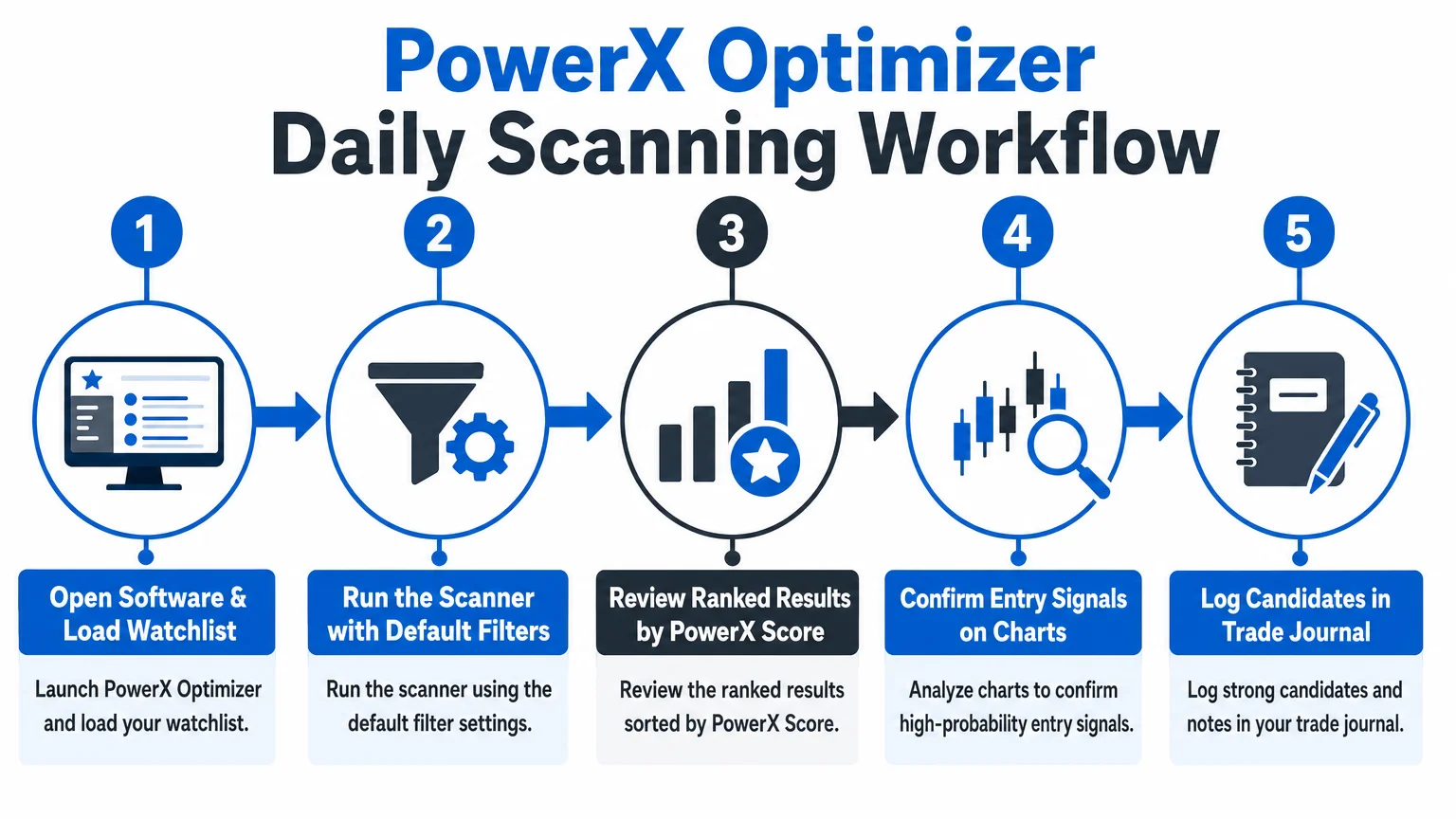
Here is the foundational setup sequence:
Step 1 — Define your trading criteria before touching the software. Before adjusting any filter, write down the parameters that define your ideal trade: minimum stock price, preferred options expiration range, maximum position size relative to account, and whether you trade stocks, options, or both. These criteria drive every filter decision that follows.
Step 2 — Set price and volume filters. Inside the scanner settings, apply a minimum price filter that matches your account size and margin requirements. Consider a minimum liquidity threshold appropriate to the instrument and strategy. Rather than relying on an arbitrary universal cutoff, review trading volume, options open interest where relevant, bid-ask spreads, and whether the planned order size can be entered and exited reasonably.
Step 3 — Configure the holding period setting. PowerX Optimizer is designed around a specific holding period model. Align the software’s holding period parameter with your actual intended hold time. A holding-period assumption that conflicts with the written trading plan can make scan results less useful.
Step 4 — Save the scan profile. Once filters are set, save the configuration as a named profile. This eliminates the need to re-enter settings each morning and ensures consistency across sessions.
Step 5 — Build a focused watchlist. Rather than scanning the entire universe every day, some users maintain a focused watchlist of companies they already understand. A curated list may make review more manageable, but it can also narrow opportunity and introduce familiarity bias; choose the universe deliberately.
What Time of Day Should the Daily Scan Run?
There is no universally best scan time. Some traders review candidates before the U.S. market opens, while others work after the close or during a scheduled session. Choose a time that permits an unhurried review of charts, earnings, news, liquidity, position size, and risk. Market information can change between a scan and an order decision, so re-check the setup before acting.
A consistent review time and sequence can make the process easier to follow and evaluate. If you are curious how market conditions affect this kind of workflow, Trading Software in a Volatile Market: Does Workflow Change? addresses that question directly.
How Should Scan Results Be Reviewed and Filtered Further?
Running the scan produces a ranked list. The next step is not to act on the top result immediately — it is to review each candidate against the chart.
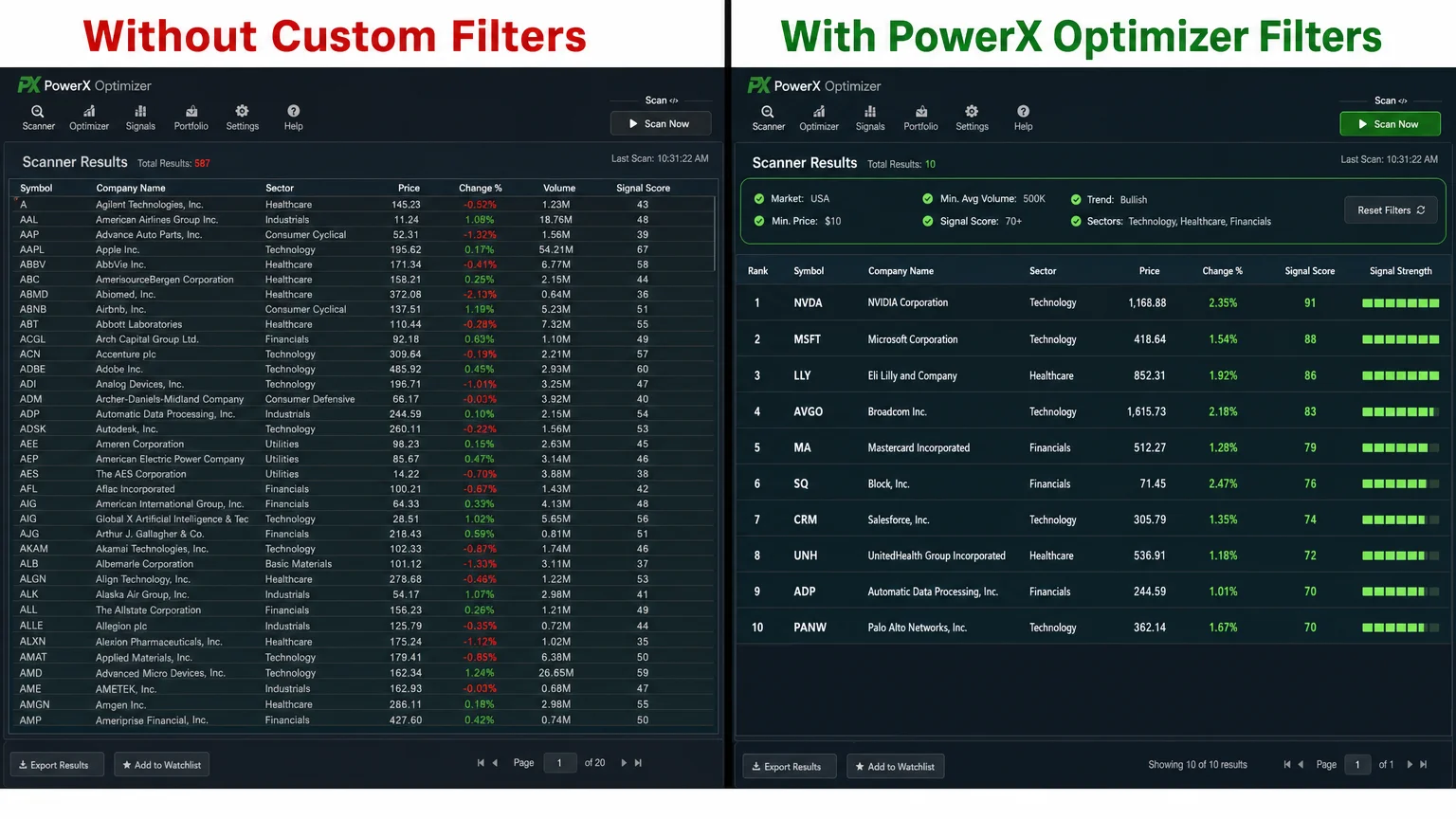
A practical review process looks like this:
| Review Step | What to Check |
|---|---|
| PowerX Score | Is it above your personal threshold? |
| Chart confirmation | Does the chart visually confirm the signal direction? |
| Options liquidity | Is there sufficient open interest and tight bid-ask spread? |
| Earnings proximity | Is an earnings announcement within the holding period? |
| Position sizing | Does the trade fit within your defined risk per trade? |
Use the checklist as a starting point and adapt it to a written trading plan. A failed risk, liquidity, or event check is a reason to pause rather than force a trade.
This review process is where the daily routine earns its value. The scanner narrows a large universe down to a manageable list; the chart review narrows that list further to genuinely viable candidates.
For traders newer to this kind of workflow, Options Trading Software for Beginners: What to Look for provides useful context on what to expect from scanning tools at different experience levels.
How Does Risk Management Fit Into the Daily Scanning Routine?
Risk parameters should be established before the scan runs, not after results appear. Seeing an attractive setup and then deciding how much to risk on it inverts the correct order of operations and introduces emotional decision-making into what should be a mechanical process.
Before each session, confirm:
- The maximum dollar amount at risk per trade (commonly expressed as a percentage of total account value)
- The maximum number of open positions at any one time
- The stop-loss level implied by the software’s signal for each candidate
PowerX Optimizer surfaces stop and target levels as part of its output. Using those levels as inputs to a position sizing calculation — rather than ignoring them — is central to how the software is designed to be used.
Trading stocks and options involves substantial risk of loss and may not be suitable for all investors. Scanner output, including any scores or signals produced by PowerX Optimizer, does not constitute investment advice. For a grounded overview of what new traders should understand before committing capital, Stock and Options Trading Risk: What New Traders Must Know is worth reading before building any live trading routine.
How Does PowerX Optimizer Compare to Running a Manual Scan?
The practical difference between a configured PowerX Optimizer routine and a manual scan built in a general-purpose platform comes down to time and consistency. A manual scan in a platform like thinkorswim requires building and maintaining custom criteria, interpreting raw output, and applying a ranking system manually. PowerX Optimizer consolidates those steps into a single interface designed specifically for the strategy it supports.
That said, neither approach is superior in every context. Traders who want full control over every filter parameter and who already have strong technical analysis skills may find a manual approach more flexible. Traders who want a structured, repeatable process with built-in ranking logic tend to find the dedicated tool more efficient. PowerX Optimizer vs. thinkorswim: A Side-by-Side Look examines that comparison in detail.
What Should a Completed Daily Routine Look Like in Practice?
A well-configured daily routine using PowerX Optimizer follows a consistent sequence:
- Pre-session (8:30–9:00 a.m. ET): Open the software, load the saved scan profile, run the scanner against the watchlist.
- Review (9:00–9:15 a.m. ET): Work through the ranked results using the five-point review checklist above.
- Shortlist: Identify two to four candidates that pass all checks.
- Position sizing: Calculate the number of shares or contracts for each candidate based on pre-defined risk parameters.
- Execution or monitoring: Place orders or set alerts depending on entry criteria.
- End-of-day log: Record what was scanned, what was selected, and what happened — even if no trades were taken.
A trading log can help compare planned decisions with actual outcomes over time, provided records are complete and interpreted cautiously.
For a candid account of what this kind of routine looks like after extended use, long-term PowerX Optimizer review provides a practical perspective.
Conclusion
Setting up PowerX Optimizer for a daily scanning routine is less about mastering the software and more about building a process that the software supports. The configuration steps are straightforward; the discipline of following the same sequence each morning is where the real work happens.
A repeatable routine — fixed time, saved scan profile, chart confirmation, pre-defined risk parameters, and a trade log — transforms a scanning tool from an occasional resource into a structured part of a trading practice.
For traders evaluating whether this tool fits their workflow before committing, How Much Does PowerX Optimizer Cost? A Verified Breakdown provides current pricing context worth reviewing.
Rockwell Trading currently describes real-time market data and a Tradier integration with two-click order placement. That is not hands-off automation: the trader must still review and authorize orders. Confirm current features, eligibility, and offer terms through the official PowerX Optimizer page. This is a paid affiliate link.
Last feature verification: September 11, 2026.
Economics Savvy is an independent affiliate site. Nothing on this site constitutes personalized investment advice. Trading stocks and options involves substantial risk of loss.
Frequently Asked Questions
How long does the initial setup of PowerX Optimizer take?
There is no universal setup or session time. A first configuration may take longer while you define filters and risk rules; later reviews may be shorter. Allow enough time to check charts, news, earnings, liquidity, position size, and risk without rushing.
Can PowerX Optimizer be used for options scanning specifically?
Yes. The software is designed to surface both stock and options candidates, and its scoring system incorporates options-relevant factors such as premium levels and liquidity. Traders focused exclusively on options can filter results accordingly within the platform.
Is it necessary to run the scan every single day?
A consistent routine can make decisions easier to document and compare, but daily trading is not required. If no setup meets the written plan—or if the trader is unavailable—passing is a valid outcome.
What happens if the scan returns no strong candidates on a given day?
No candidates meeting your criteria is a valid outcome. Forcing a trade from a weak list defeats the purpose of having filters. Many experienced traders treat low-signal days as non-trading days, which is a legitimate risk management decision.
Does PowerX Optimizer tell you exactly when to buy and sell?
PowerX Optimizer can surface entry, target, and stop information based on its methodology. Rockwell Trading currently describes a Tradier integration and two-click order placement, but this is not hands-off automation: the trader must review and authorize orders. The software does not account for personal tax circumstances or risk tolerance.
How does PowerX Optimizer handle earnings announcements?
The software does not automatically exclude stocks with upcoming earnings from scan results. Traders need to check earnings dates manually for each candidate and decide whether holding through an announcement aligns with their risk parameters.
Is PowerX Optimizer suitable for very small accounts?
The software itself does not have an account size requirement, but the strategies it supports — particularly options trades — typically require a minimum account size to execute with appropriate position sizing. Traders with very small accounts should review position sizing math carefully before using any scan output as a basis for live trading.
PowerX Optimizer owner and user since 2020, sharing first-hand workflow observations, current feature checks, and risk-aware education.