

Richard independently publishes Economics Savvy and has owned and used PowerX Optimizer since 2020. He shares first-hand observations about its workflow, features, limitations, and trading risk.
A trade signal is only useful if you understand what each component is telling you. PowerX Optimizer presents signals in a structured, repeatable format — and knowing how to read a PowerX Optimizer trade signal step by step is the difference between acting on solid information and reacting to noise. This guide walks through each element of a signal in the order the software presents it, with no jargon shortcuts.
Key Takeaways
- PowerX Optimizer generates trade signals based on three core indicators: RSI, MACD, and Stochastic Oscillator.
- Each signal includes a recommended entry price, stop loss, and profit target — all displayed on the same screen.
- The signal color (green or red) indicates directional bias: long or short.
- Confirmation requires all three indicators to align before a signal is considered actionable.
- The software ranks stocks by a proprietary score, which helps prioritize which signals to review first.
- Stop loss and profit target levels are calculated automatically, but traders should verify they match their personal risk tolerance.
- A signal is not a guarantee — it is a structured prompt to evaluate a potential trade within your own risk framework.
- Risk management decisions remain the trader’s responsibility regardless of what any software displays.
What Is a PowerX Optimizer Trade Signal?
A PowerX Optimizer trade signal is a visual and data-driven prompt generated by the software after it scans a watchlist of stocks or options for alignment across three technical indicators: the Relative Strength Index (RSI), the MACD (Moving Average Convergence Divergence), and the Stochastic Oscillator. When all three indicators point in the same direction simultaneously, the software flags the instrument with a directional signal.
The signal is not a buy or sell order. It is a structured output that tells the trader: “These three indicators are currently aligned on this instrument — here is the suggested entry zone, the suggested stop loss, and the suggested profit target based on current price action.” What the trader does with that information is entirely their own decision.
For a broader look at how the platform works overall, the PowerX Optimizer review: what it does and who it’s for provides useful context before diving into signal mechanics.
How to Read a PowerX Optimizer Trade Signal Step by Step: The Scan Results Screen
The first place a signal appears is in the scan results list. PowerX Optimizer ranks scanned instruments by a score that reflects the strength and recency of indicator alignment. Higher-ranked instruments have more recently confirmed alignment across all three indicators.
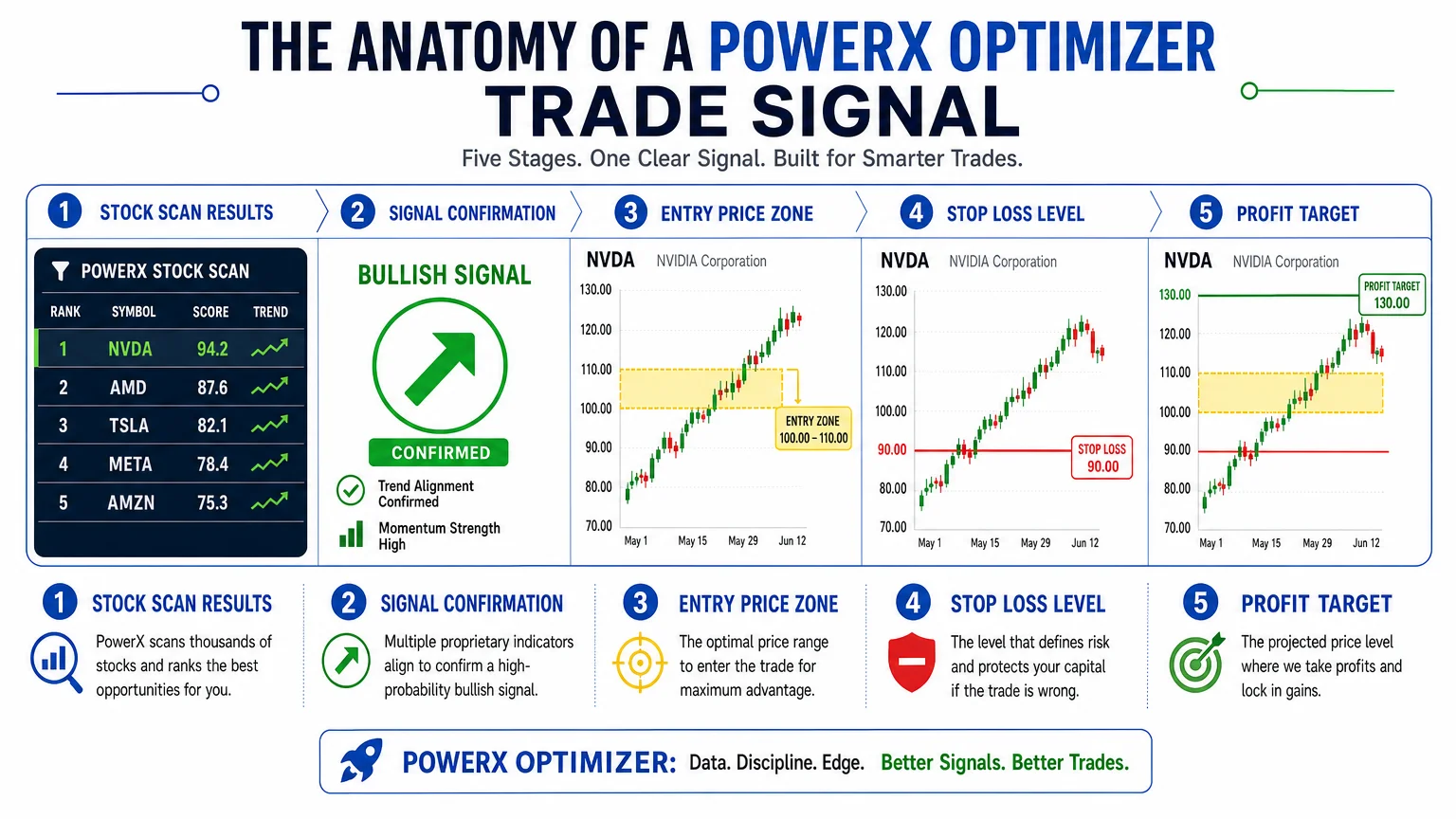
When reviewing the scan results, focus on these elements in order:
- Signal color — Green indicates a potential long (buy) setup; red indicates a potential short (sell) setup.
- Instrument name and ticker — Confirm you are looking at the correct stock or options contract.
- Score or ranking — Higher scores suggest stronger current alignment, though this does not predict future performance.
- Timeframe — PowerX Optimizer is primarily designed for daily chart analysis, meaning signals reflect end-of-day data rather than intraday noise.
Clicking on any instrument in the list opens the detailed signal view, where the actual trade parameters are displayed.
What Do the Three Indicators Actually Confirm?
The three-indicator requirement is central to how the software filters out weak setups. Each indicator measures a different dimension of price momentum:
- RSI measures whether an instrument is in overbought or oversold territory relative to recent price history.
- MACD measures the relationship between two moving averages, indicating whether momentum is building or fading.
- Stochastic Oscillator compares a closing price to its price range over a recent period, offering a second momentum read.
For a signal to appear, all three must be pointing in the same direction at the same time. If only two align, no signal is generated. This filter is intentional — it reduces the frequency of signals in exchange for a higher degree of indicator confluence. Traders should understand that confluence does not equal certainty; it means the conditions the software was designed to detect are present.
How to Read the Entry, Stop Loss, and Profit Target
Once you open a signal’s detail view, three price levels are displayed clearly:
Entry Price: The suggested price range at which the trade would be initiated. For long signals, this is typically near the current market price or a slight pullback level. For short signals, it is near the current price or a minor bounce level.
Stop Loss: The price level at which the trade would be exited to limit losses if the signal proves incorrect. PowerX Optimizer calculates this based on recent price volatility and structure. Before placing any trade, verify that the distance between entry and stop loss represents a dollar amount you are prepared to lose on a single position.
Profit Target: The price level at which the trade would be exited to capture the intended gain. The software typically displays one or more profit target levels. The ratio between the potential gain and the potential loss (risk/reward ratio) is visible on the same screen.
A practical review of these mechanics in daily use is covered in one month using PowerX Optimizer daily: honest observations, which describes how these levels appear in real workflow conditions.
How Does the Risk/Reward Ratio Factor Into Signal Evaluation?
Reading a signal correctly means reading the risk/reward ratio, not just the direction. PowerX Optimizer displays this ratio automatically, but it is the trader’s responsibility to decide whether the ratio meets their personal criteria before acting.
A common benchmark used in technical trading is a minimum 2:1 reward-to-risk ratio — meaning the profit target is at least twice the distance from entry to stop loss. If a signal shows a 1:1 ratio, many traders would pass on it regardless of how well the indicators align, because the potential upside does not justify the downside exposure.
For anyone still building their understanding of how risk parameters work in practice, stock and options trading risk: what new traders must know is a direct resource on this topic.
What Are the Most Common Signal-Reading Mistakes?
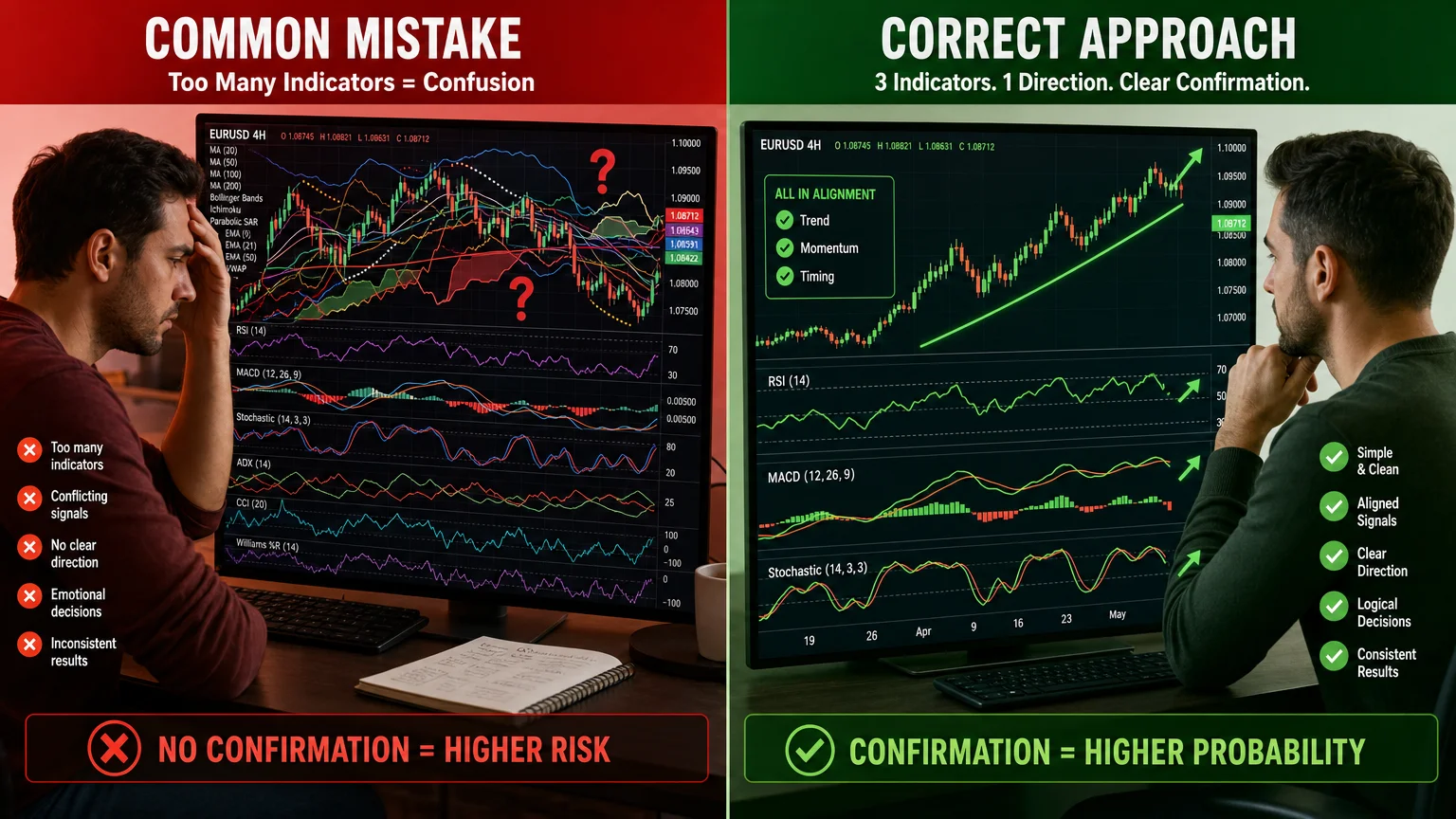
Several patterns appear repeatedly among traders who misread PowerX Optimizer signals:
Treating a signal as a directive. The software presents a structured opportunity — it does not instruct the trader to act. Every signal still requires the trader to assess position size, available capital, and current portfolio exposure.
Ignoring the stop loss level. Some traders focus entirely on the profit target and mentally discount the stop loss. The stop loss is the more operationally critical number because it defines maximum loss per trade.
Chasing a signal after the entry window has passed. If price has already moved significantly past the suggested entry level, the original risk/reward calculation no longer applies. Entering late changes the math entirely.
Overlooking the timeframe. PowerX Optimizer’s signals are built on daily charts. Checking the same instrument on a 5-minute chart and seeing different indicator readings does not invalidate the daily signal — they are measuring different things.
For a direct comparison of how this signal display differs from another popular platform, PowerX Optimizer vs. Thinkorswim: a side-by-side look addresses the workflow differences clearly.
How to Verify a Signal Before Acting
A structured verification process before acting on any signal reduces impulsive decisions. A practical checklist:
| Verification Step | What to Check |
|---|---|
| Indicator alignment | All three indicators (RSI, MACD, Stochastic) confirm the same direction |
| Entry price proximity | Current price is near the suggested entry, not already far past it |
| Stop loss dollar amount | Loss if stopped out is within your per-trade risk limit |
| Risk/reward ratio | Profit target is at least 2x the stop loss distance (or meets your own standard) |
| Position sizing | Number of shares/contracts calculated based on stop loss distance and account size |
| Broader market context | No major earnings releases, economic reports, or events that could invalidate the setup |
This table does not replace a personal trading plan — it supplements one. Traders who want to understand the full cost structure of the software before committing to it can review how much does PowerX Optimizer cost: a verified breakdown.
Conclusion
Reading a PowerX Optimizer trade signal correctly is a procedural skill, not an intuitive one. The software presents structured information — indicator alignment, entry zone, stop loss, profit target, and risk/reward ratio — in a consistent format. The trader’s role is to verify each element against their own risk parameters before deciding whether to act.
No signal, regardless of how well the indicators align, removes the inherent uncertainty of trading. Understanding what the signal is actually communicating, and what it is not, is the foundational skill this platform is built around.
For those still evaluating whether the platform fits their workflow, the PowerX Optimizer review: what it does and who it’s for is a practical next read.
Risk Disclosure: Trading stocks and options involves substantial risk of loss and is not suitable for all investors. Economics Savvy is not a registered investment adviser and does not provide personalized investment advice. Nothing in this article should be construed as a recommendation to buy or sell any security.
Frequently Asked Questions
What does a green signal mean in PowerX Optimizer?
A green signal indicates that all three indicators — RSI, MACD, and Stochastic Oscillator — are currently aligned in a bullish (upward) direction on the daily chart. It suggests a potential long trade setup, not a guaranteed profitable trade.
Can a signal appear and then disappear before I act on it?
Yes. Because signals are based on dynamic indicator readings, a signal that appears at the end of one trading session may no longer meet all three criteria by the next session if price or momentum shifts overnight.
Does PowerX Optimizer tell me how many shares to buy?
The software displays the entry, stop loss, and profit target levels. Position sizing — how many shares or contracts to trade — is the trader's own calculation, typically based on how much capital they are willing to risk per trade relative to the stop loss distance.
Is a high score in the scan results a stronger signal?
A higher score reflects more recent and stronger indicator alignment at the time of the scan. It does not predict future price movement or guarantee a better outcome. It is a prioritization tool, not a performance predictor.
How often does PowerX Optimizer generate signals?
Signal frequency depends on the watchlist size and current market conditions. In trending markets, more instruments may show alignment. In choppy or low-volatility markets, fewer signals typically appear. The software does not generate artificial signals to fill a quota.
Are options signals read differently than stock signals?
The core signal structure — entry, stop loss, profit target, indicator alignment — is the same. Options signals involve additional considerations such as expiration date, strike selection, and implied volatility, which the trader must evaluate independently.
Where can I learn more about the platform's full feature set?
The PowerX Optimizer FAQ: 12 questions busy traders ask covers a wide range of practical questions about the software's capabilities and limitations in one place.
Richard independently publishes Economics Savvy and has owned and used PowerX Optimizer since 2020. He shares first-hand observations about its workflow, features, limitations, and trading risk.