

Economics Savvy provides independent, risk-aware reviews of trading software and education based on daily use. Affiliate links are clearly disclosed; content is educational, not investment advice.
Roughly 70% of retail traders exit losing positions too late — not because they lacked a signal, but because they misread the one they had. Knowing how to read a PowerX Optimizer signal before you trade is not a minor detail; it is the difference between executing a structured setup and reacting to noise.
This guide walks through every component of a PowerX Optimizer signal in the order a trader should actually review them, from indicator alignment to risk parameters, before a single order is placed.
Key Takeaways
- A PowerX Optimizer signal is only actionable when all three core indicators align — not just one or two.
- The software displays a clear color-coded entry bar, but that bar alone does not constitute a complete read.
- Stop-loss and profit target levels are generated alongside the signal and must be reviewed before entry.
- Position sizing based on the displayed risk range is a required step, not optional.
- Signals can appear on stocks and options; the interpretation process differs slightly between the two.
- Confirmation of trend direction, momentum, and volatility should all be checked in sequence.
- Trading always involves substantial risk of loss; no signal guarantees a profitable outcome.
What Is a PowerX Optimizer Signal, and How Is It Generated?
A PowerX Optimizer signal is a color-coded alert produced when the software’s three built-in indicators simultaneously reach a defined threshold on a given ticker. The platform, developed by Rockwell Trading, scans a pre-loaded watchlist and flags stocks or ETFs that meet the entry criteria for either a long or short trade.
The signal is not a prediction. It is a structured observation that a set of technical conditions has been met at a specific point in time. Understanding that distinction matters before any trade is placed. For a broader overview of what the platform does and who it is designed for, the PowerX Optimizer review: what it does and who it’s for covers the foundational context.
What Are the Three Indicators Behind Every Signal?
PowerX Optimizer uses three indicators that must align before a signal is generated. While Rockwell Trading does not publish the exact proprietary formula, the platform is built around well-established technical concepts:
- Trend direction — typically derived from a moving-average-based calculation that identifies whether price momentum is rising or falling over the relevant lookback period.
- Momentum oscillator — measures the rate of price change to confirm that the trend has enough force behind it to be worth entering.
- Volatility filter — assesses whether the current price range is wide enough to offer a meaningful profit target relative to the required stop-loss distance.
A signal appears only when all three point in the same direction. If two align but the third does not, the software does not generate an entry bar. This built-in filter reduces the number of setups displayed, which is intentional — the strategy prioritizes selectivity over frequency.
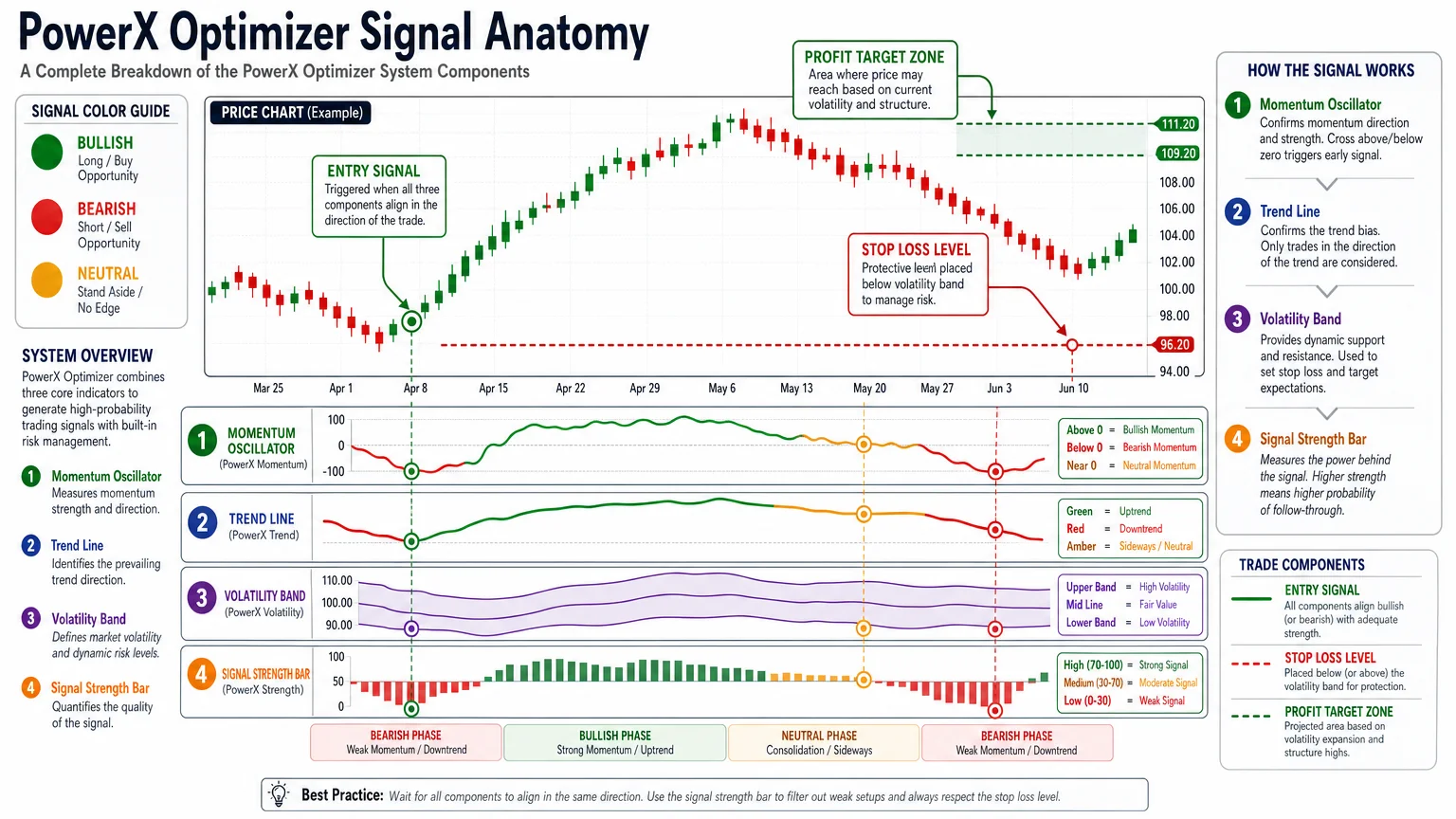
Traders who skip verifying all three components and act on a partial read are effectively overriding the system’s own logic. That is a common source of avoidable losses, not a flaw in the signal itself.
How to Read a PowerX Optimizer Signal Step by Step
Reading a PowerX Optimizer signal correctly follows a specific sequence. Rushing any step undermines the integrity of the setup.
Step 1 — Identify the signal bar color. A green bar indicates a long (buy) signal. A red bar indicates a short (sell) signal. The bar appears on the daily chart at the close of the session in which the criteria were met.
Step 2 — Confirm the signal is current. Signals from prior sessions that were not acted upon are not automatically valid the next day. Price may have moved significantly. Always check whether the current price is still within a reasonable range of the original entry level shown.
Step 3 — Read the stop-loss level. PowerX Optimizer displays a stop-loss level alongside every signal. This is not a suggestion — it is a structural component of the trade setup. Entering without noting this level means trading without a defined exit on the losing side.
Step 4 — Read the profit target. The platform also displays one or more profit target levels. Review these before entry to confirm the reward-to-risk ratio meets your personal threshold. Many traders using rule-based systems require at least a 2:1 ratio before considering a trade.
Step 5 — Calculate position size. Use the distance between the entry price and the stop-loss level to determine how many shares or contracts to trade given the amount of capital you are willing to risk on this single position. This step must happen before the order is placed, not after.
Step 6 — Check broader market conditions. A valid signal on an individual ticker can still fail if the broader market is in a sharp counter-trend move. A brief check of a major index (such as the S&P 500) for obvious directional conflict takes under a minute and adds meaningful context.
How Do PowerX Optimizer Signals Differ for Options Trades?
When applying a PowerX Optimizer signal to an options trade rather than a stock trade, the entry mechanics change even though the signal itself looks identical on the chart.
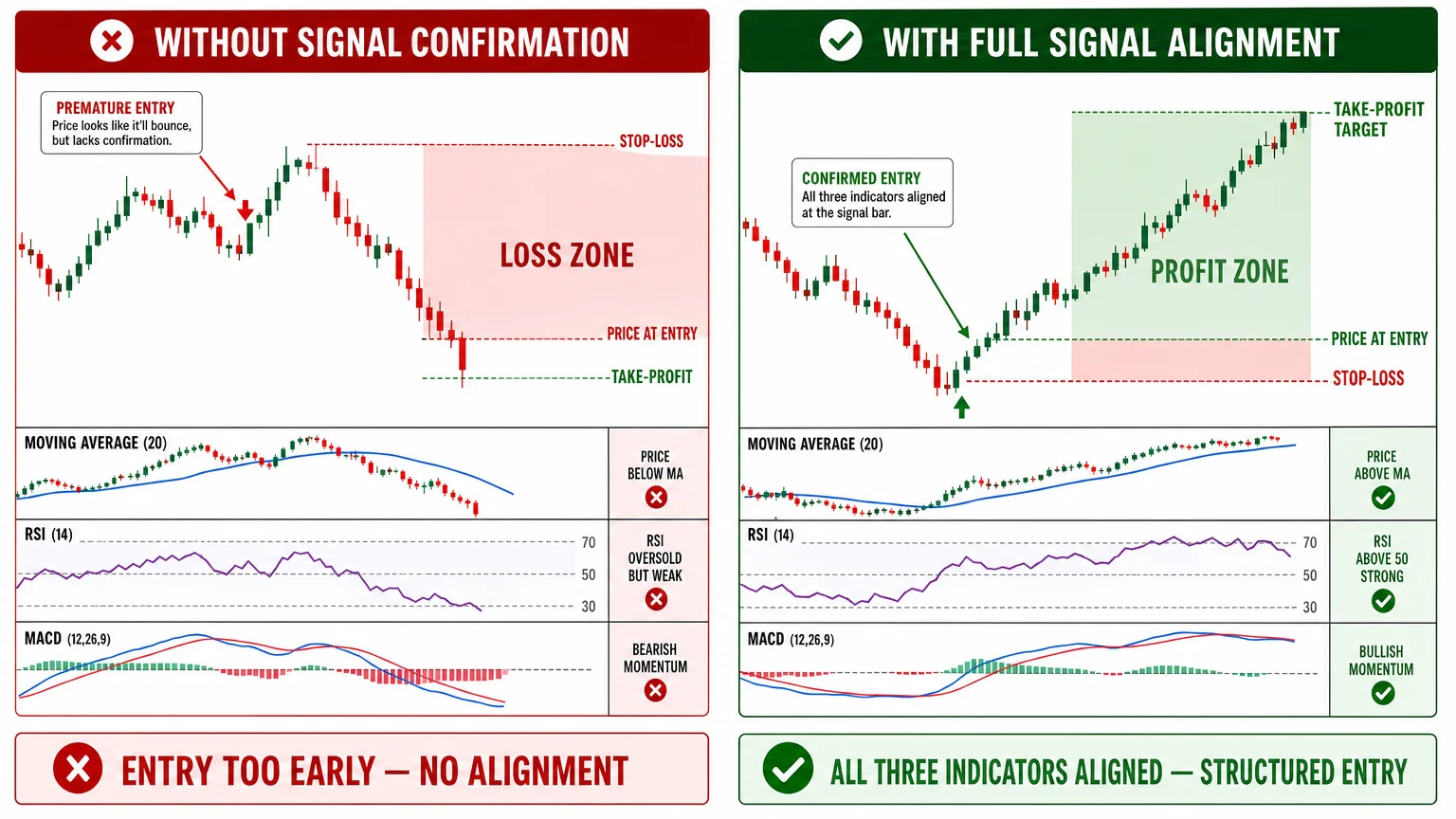
For options, the signal still identifies direction and timing, but the trader must then select the appropriate expiration date and strike price. Rockwell Trading’s training materials recommend specific guidelines for this — typically favoring in-the-money calls or puts with sufficient time to expiration to avoid excessive time decay eroding the position before the target is reached.
The stop-loss logic also translates differently. Because options lose value through theta decay regardless of price movement, a signal that appears valid on the stock chart may still result in a loss if the options contract was poorly structured. Traders exploring this dimension will find the options trading education section a useful companion resource.
What Are the Most Common Misreads of a PowerX Optimizer Signal?
Even experienced traders misread signals in predictable ways. The most frequent errors include:
| Misread | What It Looks Like | Why It Matters |
|---|---|---|
| Acting on a one-day-old signal | Entering at yesterday’s entry price today | Price may have already moved past the logical entry zone |
| Ignoring the stop-loss distance | Entering without noting the risk level | No defined exit means emotional decision-making under pressure |
| Treating a signal as a guarantee | Sizing too large based on “confidence” | Every signal carries real probability of loss |
| Skipping position sizing | Buying a round number of shares | Risk per trade becomes undefined and inconsistent |
| Trading against the broader trend | Entering a long signal in a sharp market downturn | Increases probability the setup fails before reaching target |
Understanding these failure modes is part of what separates systematic trading from guesswork. For a deeper look at how this platform compares to a more traditional charting environment, the PowerX Optimizer vs. Thinkorswim comparison covers the structural differences clearly.
What Risk Disclosures Should You Review Before Acting on Any Signal?
Trading stocks and options involves substantial risk of loss and is not appropriate for every investor. A PowerX Optimizer signal is a technical output from a software tool — it is not personalized investment advice, and no signal system eliminates the possibility of losing capital.
Before acting on any signal, traders should review their own financial situation, risk tolerance, and familiarity with the instruments involved. Economics Savvy is not a registered investment adviser and does not provide personalized financial guidance. For a full explanation of how this site operates and its relationship with Rockwell Trading, the affiliate disclosure page provides complete transparency.
The trading risk section of this site covers the structural risks of both stock and options trading in greater detail and is worth reviewing before committing capital to any strategy.
Conclusion
Reading a PowerX Optimizer signal correctly is a repeatable process, not an instinct. The signal bar is the starting point, not the finish line — stop-loss levels, profit targets, position sizing, and market context all need to be reviewed in sequence before an order is placed.
Traders who treat the signal as a checklist rather than a trigger tend to apply it more consistently. Consistency, in turn, is what makes any rule-based system worth using in the first place.
For a broader foundation on how trading software fits into a structured approach to the markets, explore the trading software section or review the stock trading education resources available on this site.
Frequently Asked Questions
What does a green signal bar mean in PowerX Optimizer?
A green signal bar indicates that the software's three core indicators have aligned in a bullish direction, suggesting a potential long (buy) setup. It does not guarantee a profitable trade — it means the defined entry criteria have been met on that ticker at that point in time.
Can I act on a PowerX Optimizer signal the day after it appears?
Not automatically. A signal generated at the prior session's close should be re-evaluated the next morning. If price has moved significantly away from the original entry level, the risk-to-reward ratio may no longer be valid, and the setup should be skipped or reassessed.
Does PowerX Optimizer tell me how many shares to buy?
The platform provides the entry price, stop-loss level, and profit target, which gives you the inputs needed to calculate position size. The actual sizing decision — how much capital to risk — is made by the trader based on their own account size and risk parameters.
Is a PowerX Optimizer signal the same as a buy recommendation?
No. A signal is a technical output indicating that specific chart conditions have been met. It is not personalized investment advice. Economics Savvy and Rockwell Trading are not registered investment advisers, and no signal should be treated as a guaranteed recommendation.
How often do PowerX Optimizer signals appear?
Signal frequency varies depending on the watchlist being scanned and current market conditions. The system is designed to be selective — it filters out setups where the three indicators do not fully align, so the number of signals on any given day can range from zero to several depending on market activity.
Do signals work the same way for options as for stocks?
The chart signal itself looks identical, but applying it to an options trade requires additional decisions about strike price and expiration date. Options also carry time decay risk that does not affect stock trades, so the signal interpretation process has extra steps for options traders.
Where can I learn more about the PowerX Optimizer platform overall?
The PowerX Optimizer review: what it does and who it's for provides a structured overview of the platform's features, workflow, and intended audience without overstating performance claims.
Economics Savvy provides independent, risk-aware reviews of trading software and education based on daily use. Affiliate links are clearly disclosed; content is educational, not investment advice.